
Your chess academy, run from one board
Enrolment, batches, fees, parent updates and student training in one place. The copilot drafts, and you decide what goes to families.
- 08:12, for the counsellor. A parent asks on WhatsApp. The copilot scores the lead and drafts a reply. Outcome: trial set, sat 10:00.
- 17:30, for the front desk. The coach takes the register. A missed class gets a make-up offer, drafted for approval. Outcome: make-up offer sent.
- 18:45, for the coach. Stockfish checks every move. The copilot explains the mistake in plain words. Outcome: saved as a puzzle.
- 19:15, for accounts. Twelve fees are overdue. Template reminders go on schedule, and the personal follow-ups wait for you. Outcome: 12 follow-ups sent.
- Month end, for parents. The copilot drafts the report narrative from the record. A coach approves the AI text before families see it. Outcome: sent to 3 guardians.
08:12, for the counsellor. A parent asks on WhatsApp. The copilot scores the lead and drafts a reply. Outcome: trial set, sat 10:00.


Works with the tools your academy already uses
- Lichess
- Chess.com
- Stockfish
- Maia
- Razorpay
- UPI AutoPay
- Stripe
- WhatsApp Business
A flat monthly price
Plans by capacity, never per student, with a free plan to start.
Fees that collect themselves
Razorpay UPI AutoPay and Stripe, with a receipt for every payment.
Families stay in control
Consent notices, data export and erasure for every family.
The power of all your apps, in one
AI-nativeacademy OS
You don’t need a separate CRM, batch scheduler, billing app and parent chat group. Leads, trial classes, fees and parent updates all run here, on one record per student, so nothing at your academy is typed twice.
OpenAI, ChatGPT, Grok, Claude, Gemini, Qwen, HubSpot, Zoho, Google Forms, Calendly, Zoom, Google Sheets, Notion, Mailchimp, QuickBooks, Stripe, Razorpay, WhatsApp and all other product names, logos and brands are trademarks or registered trademarks of their respective owners. They are shown only to illustrate the kinds of tools academies use and do not imply any affiliation with, endorsement by, sponsorship by or partnership with ChessCore. Only the integrations listed on our Integrations page are connected to ChessCore.
Your week
What leaves your desk
The same academy week, before and after. The work still gets done. You approve it instead of typing it.
Four wait for your yes. The rest happen on their own or in class.
- 0By hand
- 4You approve
- 2Runs on its own
- 1Done in class
AI drafts wait for a person unless you turn on recap auto-publish. Reminders are fixed templates.
 EnquiriesDailyEvery enquiry lands in one pipeline, scored, with a reply drafted and a trial slot offered.You approve
 AttendanceEach classThe coach marks it in class and it lands on every student’s record.Done in class
 Make-upsWeeklyA missed class becomes a make-up offer, drafted for you to send.You approve
 Game reviewsWeeklyStockfish reviews two new synced games per student each night, and the mistakes become puzzles.Runs on its own
 FeesMonth startAutoPay collects. Reminders for the rest wait for one approval.You approve
 Progress reportsMonth endReports are drafted from the record. A coach reads and approves them.You approve
 How it is goingAny timeOne dashboard, and a summary for owners and admins every Monday at 08:00.Runs on its own
Your team
Everyone at your academy, on one record
Counsellor, front desk, accounts, coaches, parents and students work on the same record. Each one sees the part that is theirs.

Owner
Hannah
Know how every centre is doing, and approve what matters.
- Revenue, attendance and progress on one dashboard
- Approves fee reminders, refunds and reports
- Every action by staff and the copilot in the audit trail
Access on this record6 of 6 parts
- Enquiry
- Batch
- Games
- Fees
- Guardian
- Reports
Cannot see: Nothing is hidden from you. You set what everyone else sees.

Counsellor
Liam
Every enquiry answered, scored and booked into a trial.
- One pipeline for every enquiry, scored by the copilot
- Replies drafted and trial slots offered
- WhatsApp and email campaigns, and referrals
Access on this record3 of 6 parts
- Enquiry
- Batch
- Games
- Fees
- Guardian
- Reports
Cannot see: Fees, games and coaching reports.

Front desk
Noor
Batches, attendance and make-ups run without a notebook.
- Recurring batches across every centre
- Attendance from class lands on the record
- Make-ups and substitute coaches, logged
Access on this record3 of 6 parts
- Enquiry
- Batch
- Games
- Fees
- Guardian
- Reports
Cannot see: Payments, coach pay and coaching notes.

Accounts
Wei
Fees collect themselves, and every payment has a receipt.
- Razorpay UPI AutoPay and Stripe
- Invoices and a ledger for each family
- Revenue figures that export to CSV
Access on this record2 of 6 parts
- Enquiry
- Batch
- Games
- Fees
- Guardian
- Reports
Cannot see: Games, reports and coaching notes.

Coach
Coach Elena
Teach the class. The paperwork is drafted for them.
- A live classroom with a shared board
- Stockfish reviews the games a coach picks, plus two synced games a night
- Reports and class recaps drafted for approval
Access on this record3 of 6 parts
- Enquiry
- Batch
- Games
- Fees
- Guardian
- Reports
Cannot see: Fees, and batches that are not theirs.

Parent
Valentina G., Lucas’s mother
Progress, payments and the coach’s word, in one place.
- A portal on any phone, with nothing to install
- Class recaps on WhatsApp once a coach approves them
- A receipt for every payment
Access on this record5 of 6 parts
- Enquiry
- Batch
- Games
- Fees
- Guardian
- Reports
Cannot see: Any other family’s child.

Student
Lucas M.
Train on their own mistakes between classes.
- Puzzles from their own games, due on the right day
- Maia opponents at five levels
- Homework, quizzes and live tournament standings
Access on this record2 of 6 parts
- Enquiry
- Batch
- Games
- Fees
- Guardian
- Reports
Cannot see: Other students’ records, and anything about fees.
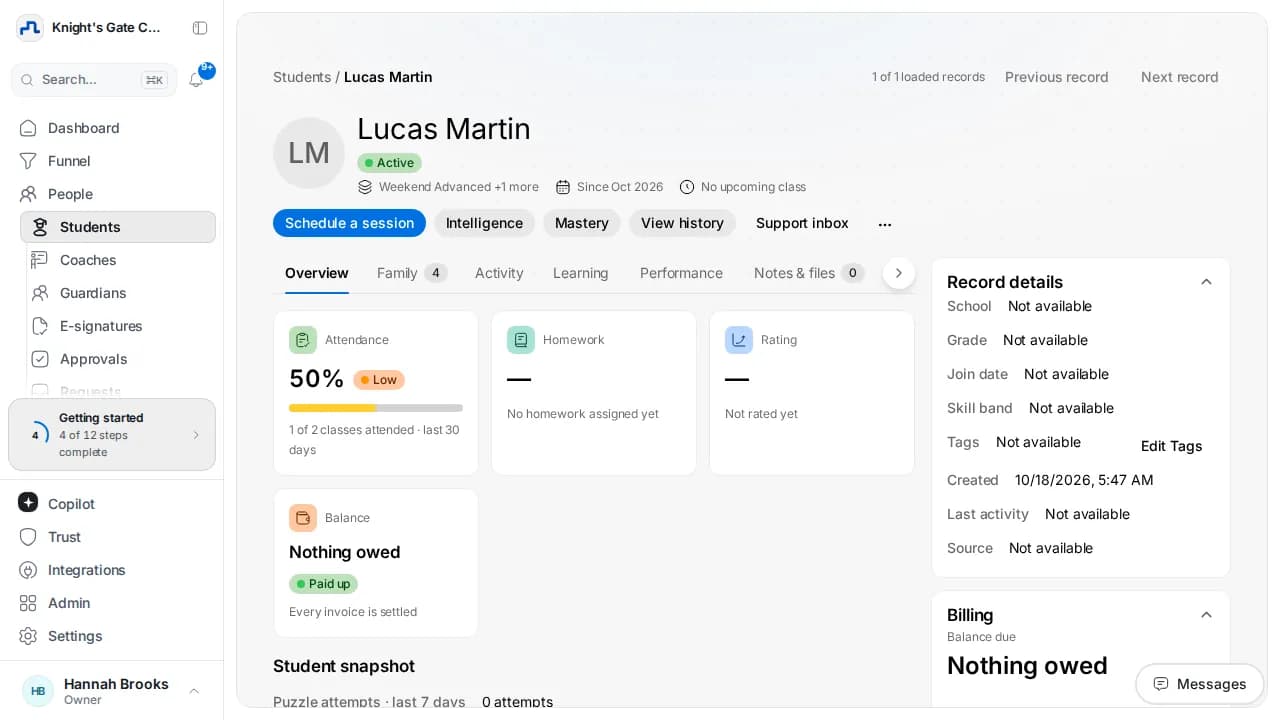
Lucas M.
Age 9, intermediate, rating 1342
Viewing as ownerEnquiry and trial
- Came from
- Academy page
- Trial
- Sat 10:00, batch B1
Batch and attendance
- Batch
- B2, Thursdays 5:30
- Attendance
- 94%, one make-up
Games and training
- Lichess
- 3 games reviewed
- Puzzles
- 4 due, rating 1342
Fees and ledger
- October
- $180, card AutoPay
- Status
- Paid 1 Oct, receipt sent
Guardian and consent
- Guardian
- Valentina G.
- Consent
- Recorded 12 June
Reports and messages
- October report
- Drafted 15 Oct, with Coach Elena
- Last recap
- Thursday, on WhatsApp
Latest on this record
- Paid October by card AutoPay1 Oct
- Marked Lucas present in B2Thu 17:34
- Imported 3 games from LichessMon 20:05
- Opened the October report draft15 Oct
Example setup with demo data and generated portraits. You decide what each role can see and do.
Your numbers
See the whole academy without asking anyone
Money, retention, attendance, coaches, student progress and enquiries, from the same records your team already keeps. Nobody has to compile a thing.
Knight's Gate Chess Academy / Analytics
All centresUpdated just nowAnalytics
Collected
$19.4k
$120 more than September
Outstanding
$1,992
12 families, template reminders sent
On AutoPay
%
41 of 120 families
Collected in October so far, every four days, in thousands of dollars
What changed: The first four days were the largest, through AutoPay on the 1st.
The product, recorded
Watch ChessCore run a demo academy
A silent walkthrough of ChessCore on its built-in demo academy, from the dashboard to the invoice. Every name and amount on screen is demo data.
 01Dashboard, owner
0:05The dashboard shows revenue collected, active students and outstanding fees for the last 30 days.
 Six people, one academy. Demo data and generated portraits.
Try the copilot
Ask your academy anything
The copilot reads attendance, ratings and payments from your own records. This one runs on a demo academy and knows three questions.
CopilotAnswered from your records
Knight's Gate Chess Academy
Read 3 October sessions in Batch B2. Three students in Batch B2 missed two of the three October classes.
Who missed batch B2 twice this month?
- attendance.list(batch: B2, month: October)3 sessions
- students.filter(missed: 2 or more)3 students
Three students in Batch B2 missed two of the three October classes.
 Hana K.Batch B2, Thursdays2 missed
 Kofi M.Batch B2, Thursdays2 missed
 Omar H.Batch B2, Thursdays2 missed
Sources1B2 register, October2Student records
Your AI, your records
Connect your whole academy to Claude, ChatGPT, Gemini or Perplexity



ChessCore gives AI assistants an MCP server and a public REST API. Each connection uses a scoped API key or OAuth, and an assistant receives only the records your academy authorises it to read. Claude, ChatGPT, Gemini CLI and Perplexity each let you add a custom MCP server on the plans that offer it, as does any other assistant that supports MCP.
Operations
Scheduling, operations and billing in one place
Put students into batches, set recurring schedules, keep track of make-ups and collect fees, all on the same record.
Recurring batches and attendance
Centre classrooms and online batches on recurring schedules, with attendance marked in class and kept on every student’s record.
Make-ups and substitutions
A missed class turns into a make-up on the record, and when a coach cannot take a batch a substitute takes it, with the change logged.
Razorpay UPI AutoPay and Stripe
UPI AutoPay e-mandates in India and Stripe cards worldwide, so a recurring fee is collected on the date the parent agreed to.
Invoices and a ledger for each family
GST-ready invoices and one ledger per family, so every payment, receipt and balance sits in one place you can read at a glance.
More than one centre
Run several centres and online batches side by side, each with its own batches, coaches and fees, and see the whole academy from one seat.
Tournaments
Swiss, round-robin, knockout, team and arena events, with public registration, tiebreaks and standings that update live.




Student record
One record for every student’s chess journey
- Link a student’s Lichess account and their games arrive on the profile. Chess.com games come in as a read-only import. Stockfish marks the mistakes in each one.
- Tournament results and rated games build a chart from the first week, so a parent sees improvement on a line rather than in a promise.
- Mistakes from a student’s analysed games join their spaced-repetition puzzle queue, so practice goes to exactly what went wrong.
- One profile per student with guardian contacts, consent notices and attendance history, and an export or erasure when a family asks for one.



For your students
A training ground for every student
Your students train inside the same system you run, so their puzzles, games and ratings show up in the reports you send home.
Due today
Back rankForksPinsThis week
White to move, rated 1420
6,095,563 rated puzzles
Spaced repetition brings each student’s weak themes back on the day they are due.
Games reviewed by Stockfish every night
Up to two new synced games per student each night, and the mistakes come back as puzzles in their queue.
Opponents that play like people
Maia at five levels, from about 1100 to about 1900.
A live classroom
Video, audio and a shared board the coach drives, every move synced to the class.
Tournaments with live standings
Swiss, round-robin, knockout, team and arena pairings.
Integrations
Your tools keep working. ChessCore connects them.
- Lichess and Chess.comLichess games sync to each student’s profile, Chess.com games import read-only, and Stockfish reviews both.Works with Lichess and Chess.com.3 games importedLucas M., 2 min ago
- WhatsApp BusinessClass recaps go to parents once a coach approves them, or on their own if you turn on auto-publish. Fee links follow your schedule.Works with WhatsApp.Recap approved and sentB2 parents, 18:05
- Razorpay and StripeUPI AutoPay e-mandates, card payments, GST-ready invoices and a receipt for every payment.Works with Razorpay and Stripe.$180 paid on AutoPayMüller family, receipt sent, 09:02
- Move 17: Rd8# missedAdded to the puzzle queueStockfish and MaiaStockfish evaluates every position, and Maia gives students human-like opponents at five levels.Works with Stockfish and Maia.



Parents
A calm parent experience that builds lasting trust
Families see what the coach sees, written by the coach or approved by one, in a place that is easy to open.
- Parents sign in from the browser to see attendance, invoices, ratings and homework. Families can also use the academy-branded app, which installs to the home screen.
- After class the copilot drafts a short recap with the homework. The coach reads it and approves it, unless your academy switches on auto-publish.
- Payment links and AutoPay mandates that land in the family’s ledger the moment the parent pays, with a receipt they can keep.
- Monthly progress reports with the games behind them. AI-written report text is approved by a coach; automatic monthly emails carry only counts and ratings.

Trust and control
AI that waits for your move
The copilot drafts from your records and Stockfish handles every chess evaluation. By default its drafts for families wait for a person, and refunds or invoices marked paid need a second approver.
How we protect student data- YouAsk in plain wordsWho hasn’t paid October fees?
- CopilotDrafts from your records12 reminders, each with its payment link
- YouApprove, edit or discardMoney and families wait for a person
- FamilySent and loggedWho asked, what changed, who approved
One audit trail
Who asked, what changed and who approved it, on every action by staff and by the copilot. Filter it by person and export it.
Exports to CSVShowing 5 of 5 example events
- 10:42
Marcus approved 9 class recaps
B1Drafted by the copilot
- 10:36
The copilot checked a $180 refund against the ledger
Nguyen familyOCT-0419 paid twice, 2 and 3 Oct
- 10:31
The copilot requested a $180 refund
Nguyen familyAsked by Wei, accounts
- 10:15
Elena corrected attendance
B2, Thursday 8 October
- 09:58
The copilot drafted 14 October progress reports
B2Held for Elena to review
Append-only. Nobody, the owner included, can edit or delete an entry.
- 10:42
Two approvers for money
When the copilot moves money, such as a refund or a fee change, a second person with approval rights must agree. Nobody can approve their own request.
Waiting for youRefund request
$180
Nguyen family, paid twice, asked by Wei- Requested by the copilotAsked by Wei, accounts, 10:31
- Checked against the ledgerOCT-0419 paid twice, 2 and 3 Oct
- Second person: youHannah, owner, or anyone else with approval rights
The week, every Monday
At 08:00 on Monday owners and admins get one summary: attendance, open invoices and the students at risk of leaving.
Weekly summary
Monday, 08:00To owners and admins
Active students
%
Attendance
- New this week
- 9
- Open invoices
- 7
- Students at risk of leaving
- 2
Counts only. Names stay inside ChessCore.
Roles for every coach
Owner, admin, front desk, accounts, counsellor, sales, coach, parent, student and partner school roles, so each person sees only what their role allows.
+ CustomOwner. Everything, including payroll and the audit trail.
Admin. Runs the academy day to day. Payroll is view only here.
Coach. Their own batches, and their own earnings.
Parent. Their own children only, in the parent portal.
Student. Their own games, homework and progress.
Example permissions for the coach role Area View Edit Approve Fees Not allowed Not allowed Not allowed Students Allowed Not allowed Not allowed Attendance Allowed Allowed Not allowed Payroll Allowed Not allowed Not allowed Audit trail Not allowed Not allowed Not allowed Example setup. You choose, and the copilot follows the same rules.
Data rights, built in
DPDP consent notices, data export and erasure for every family.
- Consent notices
- Export
- Erasure
The panels show example data from a demo academy.
Price and setup
One flat price for the whole academy
Plans are priced by capacity, not per student, so a new enrolment never changes your bill inside a plan.
Grow
$109 a month, billed annually
$139 month to month. The same price from 101 to 500 students.
- Up to 500 students
- Everything in Core
- Razorpay UPI AutoPay and Stripe billing
- WhatsApp payment links and reminders
Starting out? The Free plan covers a small roster, with no credit card required.Compare every plan
Moving over
Setting up takes four steps, and we do them with you.
- 1
Tell us about your academy
On WhatsApp or email, and we set it up with you.
- 2
Bring your student list
Import it from the spreadsheet you use today, then recreate your batches on recurring schedules.
- 3
Invite your team and families
Coaches, front desk, accounts and parents each get the access you choose.
- 4
Connect payments and WhatsApp
Razorpay UPI AutoPay or Stripe for fees. WhatsApp stays, and reminders and recaps go out through it.
Overview
What is ChessCore?
AI-native management software built for chess academies, clubs and coaches.
The usual way
Spreadsheets and WhatsApp
Notebooks, group chats and memory
Attendance in a notebook, fee reminders sent one parent at a time, and progress reports skipped when the coaches run out of evenings.
The usual way
Generic studio software
Built for dance and martial arts classes
- No chess engine or game review
- No Lichess or Chess.com games
- No puzzles, tournaments or ratings
- Nothing that drafts the paperwork
The ChessCore way
One system that knows chess
Stockfish analysis and a copilot that asks first
- Stockfish on games a coach picks, plus two synced games a night per student
- Lichess sync and Chess.com import (Pro and above)
- 6,095,563 rated puzzles and five kinds of tournament
- Drafts the paperwork for a coach to approve
ChessCore at a glancePrice, payments, chess, AI, data and what is not included, in one list.
- Built for
- Chess academies, clubs and coaches, from one centre to several.
- Who uses it
- Ten roles: owner, admin, front desk, accounts, counsellor, sales, coach, parent, student and partner school, each with the access you choose.
- Price
- A free plan for a small roster, then flat monthly plans by capacity from $69 a month billed annually. Never priced per student.
- Payments
- Razorpay UPI AutoPay and Stripe, with invoices, receipts and a ledger for each family.
- Chess
- Lichess sync and Chess.com import (read only) on Pro and above, Stockfish analysis, Maia opponents, 6,095,563 rated puzzles and five kinds of tournament.
- AI
- The copilot drafts from your records and asks before it changes one, unless staff switch on auto mode. Refunds, payroll and copilot messages to guardians need a second person to approve.
- Data
- Each academy’s data is kept apart. Consent notices, export and erasure for every family, and an audit trail nobody can edit.
- Parents
- A portal on any phone with nothing to install, and class recaps on WhatsApp.
- Also included
- Screen sharing in live classes, an academy-branded app for families (it also installs to a phone home screen) and Zapier through webhooks.
FAQ
Questions owners ask
Anything we have not answered here, ask us on a demo of the product.
Request a demoWhat exactly does ChessCore do?
ChessCore runs the whole chess academy from one place: batches and recurring schedules, attendance and make-up credits, fee collection through Razorpay and Stripe, a chess profile per student with engine game analysis, and an AI copilot that drafts game reviews, progress reports, and parent messages from your real records. Students train inside it too: puzzles, games against AI and classmates, homework, and live classes on a shared board. Parents get their own portal for reports, receipts, and absences.
Do students practise inside ChessCore?
Yes. Students get a training portal with puzzles from a catalog of 6,095,563 rated puzzles, served on a spaced-repetition schedule with streaks and an academy leaderboard. They can play human-like AI opponents at five levels, challenge classmates, do homework, and join live classes where the coach drives a shared board. Tournaments run with Swiss, round-robin, or knockout pairings.
What does the AI do, and what does it never do?
The copilot drafts the paperwork: game reviews, monthly progress reports, fee reminders, and class recaps, all built from your attendance, rating, and payment records. It never evaluates a chess position (Stockfish does that), never invents a number (they come from the database), and never sends a draft to a family itself, except class recaps if your academy turns on auto-publish. Class reminders, fee reminders and monthly reports are fixed templates that send on the schedule you switch on.
Do parents need to install an app?
No. Parents get an email invite, then sign in to their portal in the browser with their own login, and the updates they care about, class recaps, fee links, and approved reports, arrive on WhatsApp. Families who want an app get the academy-branded one, which installs to a phone home screen straight from the browser.
We run on spreadsheets and WhatsApp groups today. How hard is switching?
That is the setup we built the importer for. Bring your student list in from a spreadsheet, recreate your batches with recurring schedules, and connect each student's Lichess or Chess.com account. How long setup takes depends on your records; we import the roster with you, and most of the work is checking it. WhatsApp stays, it just becomes organized: reminders, payment links, and recaps go out through it instead of manual typing.
Is my students' data safe?
Every academy's data is isolated from every other academy's. Contact details, ID numbers and dates are masked, and student names replaced or shortened, before copilot text reaches an AI model; guardian consent for minors is recorded and renewable, and rating history is append-only so a student's record can never be silently rewritten.
What does it cost?
There is a free plan for a small roster with core scheduling and the same daily copilot allowance as every plan, with Stockfish analysis included and no credit card required. Paid plans start at $69 per month billed annually, and you can change or cancel your plan from the dashboard at any time.
Can I really run the academy by talking to ChessCore?
Yes. The copilot can look things up and make changes across students, batches, attendance, fees, leads, payroll and reports, using the same permissions as the person asking. By default it asks before every change, and you can pre-approve routine actions. Refunds, marking invoices paid, payroll and copilot messages to guardians need a second approver.
Can I see who changed what?
Yes. ChessCore keeps an append-only audit trail of actions by staff and by the copilot, newest first. Owners can filter it and export it to CSV.
Who at my academy uses ChessCore?
Everyone who works on a student's record: the owner and admins, the counsellor who handles enquiries, the front desk that runs batches and attendance, whoever does the accounts, the coaches, and the parents and students themselves. Each role sees only its own part, and the owner decides what every role can see and do.
Can I see how my academy is doing without asking my team?
Yes. The analytics workspace shows revenue, retention, attendance, coach utilisation, rating improvement and the enquiry funnel from the records your team already keeps, and it exports to CSV. Every Monday at 08:00 owners and admins also get the week in one summary.
Get started with ChessCore
Set up your academy with us
- We import your roster from the spreadsheets you already keep.
- We connect Lichess, import from Chess.com, and set up batches and fee plans.
- You approve the first reports before any family sees them.
Or write to hello@chesscore.io