
ChessCore demo
See ChessCore for your chess academy
Request a demo built around your batches, fees and coach-reviewed game explanations. Tell us about your academy and what you want to see. A person on the team reads your request and replies within one business day, on WhatsApp or by email. Bring your hardest operational question.
What you will see
Five screens, on your own week
Step 1 of 5
Your week
A week of batches and attendance, including a class that moves and a make-up credit
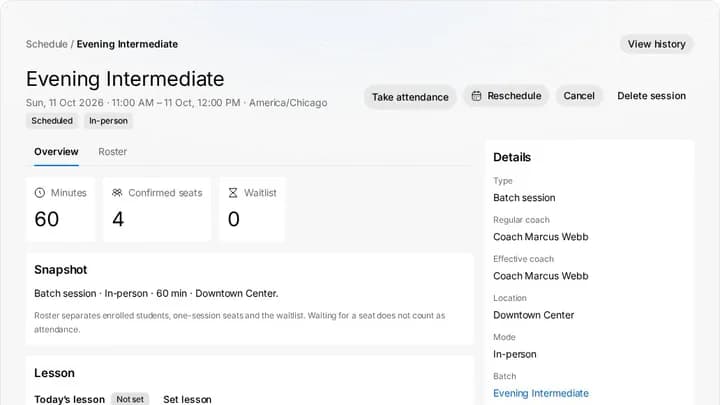
Session, demo academy Step 2 of 5
Fees
Fees: invoices, receipts and the family ledger, plus UPI AutoPay and Stripe billing on the plans that include them
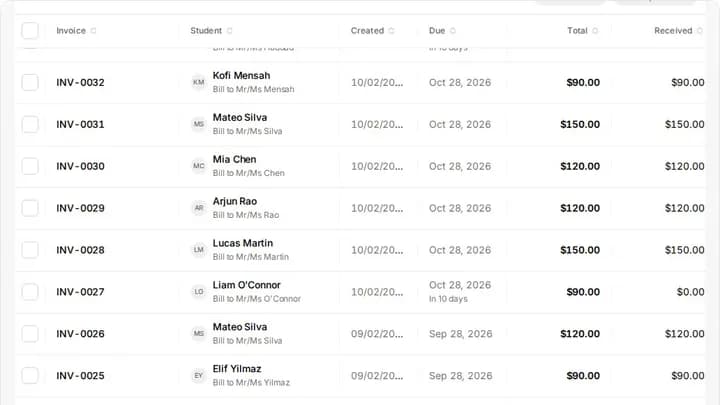
Invoices, demo academy Step 3 of 5
A game review
A game review: Stockfish finds the turning point, the AI drafts the explanation, and a coach edits it before a family sees it
Game review, coach edits the draft Step 4 of 5
Reports and the portal
A progress report and the guardian portal as a parent sees it
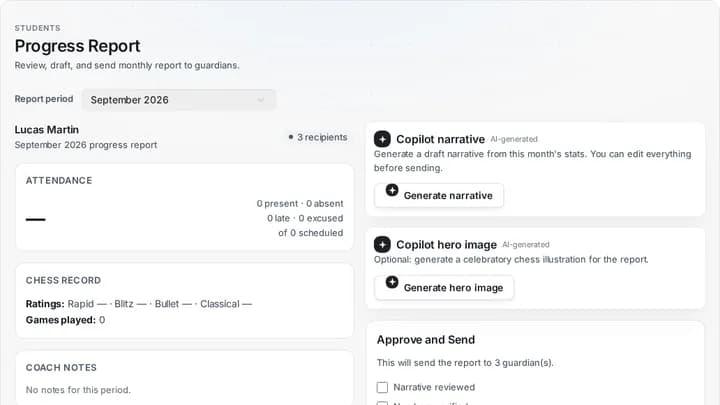
Progress report preview Step 5 of 5
Straight answers
Straight answers on pricing, plan limits and what each plan includes
- FreeFree
- Core$89 a month
- Grow$139 a month
- Pro$179 a month
- EnterpriseCustom
Plans, billed monthly

Request a demo
Three short steps: how to reach you, your academy, and what you want to see.
Request a demoWant the setup flow first? See what happens after you sign up
Built from your request
Your demo plan, on your own week
The team reads what you send and plans the session around it: your batches, your fee cycle, a game review and a report a parent would see.


Watch it before you ask
The real product on its demo academy, from an enquiry to fees. Press play; it loads only then.
Read the walkthrough as text
- 0:00ChessCore demo academy, running locally. Every student, parent, coach and amount here is made-up demo data.
- 0:05The dashboard shows revenue collected, active students and outstanding fees for the last 30 days.
- 0:14Enquiries land in Leads and move through the pipeline: New, Contacted, Trial booked.
- 0:25Ethan Walsh's lead: the stage bar, an activity log for calls and notes, a follow-up date and the trial class.
- 0:44Once a child enrols, they have a student record. Search the roster for Lucas.
- 0:50Lucas Martin's profile: 30-day attendance, homework, rating and balance, with tabs for family, activity, learning and performance.
- 1:05Sessions lists every class. Clicking one opens a quick preview, which expands to the full page.
- 1:14The Evening Intermediate session: coach, mode, location, start and end time, seats and waitlist, with a Roster tab.
- 1:29Lucas's progress report preview: attendance, chess record and coach notes for the chosen month, then an Approve and Send checklist. This demo month has nothing recorded, and the AI narrative is not generated here.
- 1:52Invoices shows what is outstanding and overdue, how late it is, and every fee with its student, amount and status. Clicking one opens a preview.
- 2:11Lucas's invoice page shows the total, recorded payments and the balance still due.
- 2:18One system from enquiry to fees. Book a walkthrough at chesscore.io/demo.
The session
Who the session is for
Academy owners, head coaches and admins who run batches, collect fees and report to parents, and who are replacing spreadsheets and chat groups or comparing software. It helps most if you bring your own week: how many batches you run, how you collect fees and what you send parents each month.
If you only want to try it, the Free plan needs no credit card. See ChessCore pricing for what each tier includes before you ask.
After you send it
What happens after your request
Your request goes to the ChessCore team. A person reads it and replies within one business day, on WhatsApp or email, and if a session makes sense, we agree a time with you there.
Worried about student data? Read how ChessCore handles security for academies that teach minors first.
Want to read first? One example academy runs a full week on the chess academy management software page, and the plans are on the pricing page.
Before you book
Questions academies ask first
What does the AI do, and what does it never do?
The copilot drafts the paperwork: game reviews, monthly progress reports, fee reminders, and class recaps, all built from your attendance, rating, and payment records. It never evaluates a chess position (Stockfish does that), never invents a number (they come from the database), and never sends a draft to a family itself, except class recaps if your academy turns on auto-publish. Class reminders, fee reminders and monthly reports are fixed templates that send on the schedule you switch on.
We run on spreadsheets and WhatsApp groups today. How hard is switching?
That is the setup we built the importer for. Bring your student list in from a spreadsheet, recreate your batches with recurring schedules, and connect each student's Lichess or Chess.com account. How long setup takes depends on your records; we import the roster with you, and most of the work is checking it. WhatsApp stays, it just becomes organized: reminders, payment links, and recaps go out through it instead of manual typing.
Is my students' data safe?
Every academy's data is isolated from every other academy's. Contact details, ID numbers and dates are masked, and student names replaced or shortened, before copilot text reaches an AI model; guardian consent for minors is recorded and renewable, and rating history is append-only so a student's record can never be silently rewritten.
What does it cost?
There is a free plan for a small roster with core scheduling and the same daily copilot allowance as every plan, with Stockfish analysis included and no credit card required. Paid plans start at $69 per month billed annually, and you can change or cancel your plan from the dashboard at any time.
Bring your hardest question
Tell us about your academy and a person replies within one business day. If you would rather start on your own, the Free plan needs no credit card.