On this page9 sections, 28 min read
- What software do you actually need to run a chess tournament?
- Which chess tournament programs are worth comparing in 2026?
- What does chess tournament software cost, and what is genuinely free?
- What are your three options for running a tournament?
- When should you use dedicated pairing software?
- What does an AICF or FIDE-rated event in India actually require?
- Where does academy software fit in running events?
- How are results, standings, and tiebreaks handled across the three?
- How do you choose the right tournament software for your event?
- Frequently asked questions
Bottom line
For a FIDE-rated Swiss use a desktop pairing program such as Swiss-Manager or Vega [1][4]; for a free pairing tool try ChessPairings.org, which lists no paid tier, or Vega's free tier of up to 20 players [10][4]; for a casual school or club night in the browser use ChessHost, free for one event a month of up to 12 players [14]. Swiss-Manager sells a lifetime licence at 150 Euro for the full version [1].
TL;DR
- There are three distinct jobs in running a tournament: generating legal pairings, entering results and computing tiebreaks, and managing the people, records, fees and parent updates around the event.
- Eight pairing programs cover almost every real decision in 2026: Swiss-Manager, Vega, SwissSys, WinTD, ChessManager, ChessPairings.org, Tornelo and ChessHost, split between desktop licences and web services.
- Prices as of 2 October 2026: ChessHost is free for one event a month of up to 12 players, with Pro at $7 a month or $18 for 3 months [14]; ChessManager Premium listed $97 per year on its homepage and $49 per year on its Premium page, so confirm at checkout [8][9]; Swiss-Manager lists 150 EUR for the full version [1].
- FIDE publishes the Swiss pairing and tiebreak rules that these programs implement, and an AICF-rated event in India is governed by your arbiter and state association, not by a published software mandate we could locate.
- ChessCore, which we build, runs academy events end to end: Swiss, round robin, knockout, arena and team pairings, live standings with tiebreaks, entry lists and fees, parent updates, and each result on the student's profile. For a FIDE-rated event, check which pairing programs your federation accepts; ChessCore exports the TRF16 rating report.
Key facts
- The Swiss system pairs players with similar running scores each round without eliminating anyone, which is why pairing needs software once fields and rounds grow.[19]
- FIDE publishes the Swiss pairing rules and tiebreak regulations in the FIDE Handbook, so rated events depend on tools that implement those published rules.[16]
- Online platforms run arena and Swiss tournaments in the browser, which removes pairing and results entry for internet events.[21]
- Games are exchanged and archived in PGN, so results captured in one tool can be moved into analysis or records elsewhere.[20]
- On 2026-08-12 Swiss-Manager listed 150 EUR for the full version and 75 EUR for the light version as a lifetime licence on its official site.[1]
- ChessCore pairs Swiss, round robin, knockout, arena and team events, publishes live standings with tiebreaks, and records each result on the student's profile alongside the entry list, fees, schedule and parent updates.
What software do you actually need to run a chess tournament?
We suggest matching the software to the event: Swiss-Manager or Vega for a FIDE-rated Swiss, ChessPairings.org or Vega's free tier when you want a free pairing tool, and ChessHost for a casual browser event with no download. You still need software for three separate jobs, and no single product does all three well. The first job is pairings, the second is results and standings, and the third is the people layer of entries, fees and parent updates. The 2026 matrix below names the actual programs, with each price exactly as its vendor publishes it.
The pairing job is the one people mean when they say tournament software, and it is genuinely specialized: a rated Swiss event has to follow published pairing rules exactly [16][19]. The results-and-standings job is coupled to pairings and is usually handled by the same program. The people layer is a completely different category, closer to a CRM or a class-management system, and it is where academy tools live. This comparison walks through all three so you can decide what to buy and what you already have.
| Need | Manual (spreadsheet) | Dedicated pairing software | Academy software (ChessCore) |
|---|---|---|---|
| Pairings | By hand; fine for tiny round-robins, error-prone for Swiss | FIDE-compliant Swiss and round-robin pairings, its core purpose | Swiss, round robin, knockout, arena and team pairings built in, with live standings and tiebreaks |
| Results entry | Typed into cells, no validation | Built in, drives the next round automatically | You record the finished result on each student profile after the event |
| Standings and tiebreaks | Manual formulas you maintain and debug | Automatic, using FIDE-endorsed tiebreak rules | Not computed; the standings come from your pairing tool or playing platform |
| Player records | A separate sheet you reconcile later | Event-scoped; forgotten after the tournament ends | Permanent student profiles with attendance and rating history |
| Fees and entry payments | Cash box and a tally column | Some web tools collect fees: TournaChess uses Stripe [25] and ChessManager Premium lists collect entry fees [9] | Fee links, receipts, and collection tracking built in |
| Parent communication | Manual WhatsApp messages one by one | None | Parent updates and receipts from the student record |
Which chess tournament programs are worth comparing in 2026?
Eight programs cover almost every real organizer decision: Swiss-Manager, Vega, SwissSys, WinTD, ChessManager, ChessPairings.org, Tornelo and ChessHost. They split into desktop licences you install and web services you log into, and the split matters more than the feature lists. The table below names each one with its type, platform and free tier as its official site describes it on 2026-08-12.
| Program | Type | Platform | Free version | Best for |
|---|---|---|---|---|
| Swiss-Manager | Desktop licence | Windows (Windows 7 and later, developed under Windows 10) | Demo version only; light or full unlock with a purchased installation code | Large FIDE-rated Swiss events, the long-standing standard |
| Vega | Desktop licence per system | Windows, macOS, Linux (Java, 64-bit) | Yes, up to 20 players free; Linux Vega free unlimited | Club and federation Swiss events on a tight budget |
| SwissSys | Desktop licence | Windows (Mac via virtualization) | Free trial for 2 rounds, then paid licence | USCF teams and Swiss events where ChessRoster sync helps |
| WinTD | Desktop licence | Windows | No, paid licence only | USCF Swiss events, long-running US club standard |
| ChessManager | Web service | Browser, any device | Yes, free tier; premium adds exports | Organizers who want entry, pairing and publishing in one web login |
| ChessPairings.org | Web service plus desktop app | Browser plus Windows 10 and 11 app | Yes, completely free, no paid tier | Free FIDE 2026-ready Swiss and round-robin events |
| Tornelo | Web service | Browser, any device | Yes, free to use | Clubs running online and hybrid tournaments with arbiter tools |
| ChessHost | Web service | Browser, phone or laptop, no download | Yes, one event a month up to 12 players, no credit card [14] | Schools, pubs and casual clubs who need QR sign-up and TV display |
Swiss-Manager is the reference desktop program on swiss-manager.at, described as FIDE approved with Swiss up to 2000 participants and 23 rounds, round-robins up to 150 rounds, and more than 180 federations as customers [1]. It has run since 1986 and is tightly coupled to Chess-Results.com for publishing, which now archives more than 1,120,000 tournaments. The download is the full program used as a demo until a purchased installation code unlocks the light or full version [23]. The light licence caps Swiss events at 60 participants and 11 rounds, so a 120-player field needs the full 150 EUR licence [1]. If you already have arbiters who trust it and you run large rated opens, it is the least disputable choice, even though it is not the cheapest and it runs only on Windows.
Vega is a set of three programs, Vega for individuals, VegaTeam for teams and Orion for team events, maintained since 2003 by vegachess.com [2][3]. As of 2 October 2026, the download page is explicit about OS-specific free limits: Vega and VegaTeam for Windows are free up to 20 players, Orion up to 6 teams, and the Linux Vega has no player-limit and is free, though that Linux build cannot run under a Windows or Mac emulator [4]. JaVaFo, the optional pairing engine, needs a Java Runtime Environment at least version 7; if you do not use JaVaFo the JRE is not necessary [4]. For a club that runs monthly 40-player Swiss events, the free Windows or Mac tier covers small batches and the paid licence stays modest at 50 EUR per system on Vega's registration page [3].
SwissSys, which its site bills as the leading tournament pairing software since 1988, is now presented together with ChessRoster [5]. The current site states a free trial for two rounds and a one-time perpetual licence with no subscription, plus auto-sync of registrations from ChessRoster and results back to ChessRoster in version 11.76 and later [5]. The order page lists $99 USD for SwissSys 11 and $49 USD for the FIDE Edition, each a one-time purchase with free updates for that major version line [22].
WinTD is the Estima desktop program at estima.com, the other long-running US pairing tool alongside SwissSys [6][7]. Its prices page on 2026-08-12 lists one copy of WinTD 5.0 at $90 USD and an update from an earlier version at $40, free if you bought after 1 January 2021 [7]. WinTD is Windows-only, imports both the US Chess and FIDE rating databases, and added FIDE-permitted tiebreaks in version 5.10, with its centre of gravity in US events [6].
ChessManager is a freemium web service at chessmanager.com where the free tier handles unlimited rounds, Swiss, double Swiss and round-robin with manual pairing and TRF export [8]. Premium adds PGN, CSV and Excel export, no ads, public tournaments, group tournaments and custom tiebreaks and scoring [9]. The two pages disagree on price: as of 16 October 2026 the homepage states the yearly price is 97 dollars [8], while the Premium checkout page at admin.chessmanager.com/premium, which defaulted to India, offered the upgrade at 49 dollars a year [9]. Both pages use a dollar sign without naming the currency, so confirm the amount and currency on the checkout screen before you pay. Because it is browser based, there is nothing to install and you can run an event from a phone, though you trade the deep desktop control Swiss-Manager offers.
ChessPairings.org is a free web service and desktop app that is explicit about its scope: FIDE 2026 pairings, 28 tiebreak systems, TRF export and live public pages, and no paid tier [10]. The homepage notes bbpPairings v6 as the pairing engine and TieBreakServer as the tiebreak engine, and the release card shows version 5.20.0 dated 27 July 2026 [10]. If your honest need is to run a FIDE-ready Swiss without buying a licence, this is the first place to trial.
Tornelo is a web platform at tornelo.com built for online and hybrid play, with the services page headlined Tornelo is free to use, always and starting options labelled free [11][12]. The services page publishes a 2.75% processing fee plus 25c per transaction, shown in AUD with a note to see other currencies, and a $15 fee cap, when you collect entry fees [12]. Bespoke event-management and arbitration services remain price on request. It is the strongest fit when you need online boards, broadcast and arbiter verification in the same place.
ChessHost is a web app at chesshost.app pitched as free chess tournament software for clubs, schools, pubs and cafes, with automated Swiss pairings, QR registration and TV display [13][14]. As of 2 October 2026, the pricing page says every account gets one free event a month, up to 12 players, with no credit card, and that ChessHost Pro, at $7 a month or $18 for 3 months, removes both limits [14]. The free plan does not expire, and the pages use a dollar sign without an ISO currency code [14]. Its homepage describes ChessHost as being for casual, unrated, in-person events: it has no ratings and submits nothing to FIDE, US Chess or any federation, so rated events need arbiter software such as Swiss-Manager, Vega or SwissSys [13]. For a classroom or pub night where you want zero install and printable certificates, one free 12-player event a month is genuinely useful [14].
Chess-Results.com is not a pairing program at all, it is the results publishing server at chess-results.com that works closely with Swiss-Manager [15]. The homepage notes more than 1,120,000 tournaments archived, and tournaments published from Swiss-Manager appear there for search and export [15]. Include it in your workflow as the place results land, not the place pairings are generated.
What does chess tournament software cost, and what is genuinely free?
Prices span free open projects to one-time desktop licences and annual web subscriptions. Every figure below is the amount the vendor publishes on its own site, in the currency it publishes, checked on the date shown. We do not convert EUR or USD to INR, there is no whitelisted FX source, and a conversion would be unsourced math, so the table keeps the vendor currency and a separate Sold in INR column.
| Program | Published price (vendor currency) | Licence | Sold in INR | Checked |
|---|---|---|---|---|
| Swiss-Manager | 150 EUR full, 75 EUR light | Lifetime one-time | not stated | 2026-08-12 |
| Vega | 50 EUR Win/Mac Vega+VegaTeam, 35 EUR Orion; Linux Vega free | Per-system perpetual | not stated | 2026-08-12 |
| SwissSys | $99 USD SwissSys 11, $49 USD FIDE Edition [22] | Perpetual one-time, free updates within v11, trial for 2 rounds | not stated | 2026-08-12 |
| WinTD | $90 USD new, $40 update | Perpetual one-time | not stated | 2026-08-12 |
| ChessManager | Free tier; Premium is 97 dollars a year on the homepage and 49 dollars a year on the checkout page [8][9] | Annual subscription; confirm the amount and currency at checkout | not stated | 2026-10-16 |
| ChessPairings.org | 0 EUR, no paid tier | Free | not applicable | 2026-08-12 |
| Tornelo | Free to use; 2.75% processing fee plus 25c per transaction (shown in AUD) when you collect entry fees | Free account, transaction fees on paid entries | not stated | 2026-08-12 |
| ChessHost | $0 for one event a month up to 12 players; Pro at $7 a month or $18 for 3 months [14] | Recurring subscription, cancel any time | not stated | 2026-10-02 |
The Sold in INR column shows whether the vendor's own checkout or pricing page offered INR as a purchase option. As of 16 October 2026 the ChessManager checkout page defaulted the country to India but still priced the upgrade in a bare dollar sign (49 dollars a year), so the currency, not just the amount, is the thing to confirm at checkout [9]. On the same date the chessmanager.com homepage stated the yearly price is 97 dollars [8]. None of the eight vendors listed an explicit INR price, so the column reads not stated for the paid licences and subscriptions and not applicable for the free projects.
The genuinely free options are easy to name. ChessPairings.org is free for any field size and lists no paid tier, with the engine open source [10]. Vega is free up to 20 players on Windows and macOS and completely free on Linux with no player limit, though that free Linux build disables Vegaresults publishing [3]. ChessHost gives every account one free event a month of up to 12 players with no credit card [14], and Tornelo's services page states free to use, always [12]. SwissSys is trial-limited [5], Swiss-Manager's download runs as a demo until a purchased installation code unlocks light or full [23], and ChessManager's free tier covers pairing and TRF export with premium only for PGN, CSV and group features [8].
Where a price is not public, the honest cell is not published or price on request. Tornelo's entry-fee processing fees are published, so those sit in the price cell; price on request applies only to Tornelo's bespoke event-management and arbitration services [12]. If you need a figure that is still unpublished, ask the vendor directly and keep the 2026-08-12 check date in your internal notes so you know when to re-verify.
What are your three options for running a tournament?
Your three options are running it by hand in a spreadsheet, running it in dedicated pairing software, or running an online tournament on a playing platform. Each fits a different event. The choice is driven less by budget than by two questions: is the event rated, and how many players and rounds are involved. Get those two answers first and the tool almost picks itself.
Manual pairing in a spreadsheet is the oldest option and it still works for a small internal event. If you are running a six-player round-robin where everyone plays everyone, the pairings are fixed in advance and a spreadsheet is genuinely enough: you type a grid, fill in results, and the standings fall out of a sum. The trouble starts with the Swiss system. In a Swiss event, players with the same running score are paired each round, nobody is eliminated, and colours must be balanced, so the pairing decision changes after every result [19]. Doing that by hand for thirty players across seven rounds is slow and, more importantly, disputable: one hand-pairing mistake in a rated event can invalidate a round. The spreadsheet does not know the rules, so you are the rules engine, and that does not scale.
Dedicated pairing software exists precisely to remove that risk. It implements the published pairing algorithms and tiebreak regulations, so it produces legal Swiss pairings for any field size, records results, and computes standings the same way an arbiter would expect [16][19]. This is the correct tool for any official or FIDE-rated event, and it is what arbiters at serious tournaments use. Its scope is narrow on purpose: it cares about the event while it is running and forgets your players afterward.
The third option is to run the tournament online. Playing platforms host arena and Swiss tournaments directly in the browser, generate pairings, record results, and publish standings automatically, which removes the pairing and results jobs entirely for an internet event [21]. For a club running a casual weekly blitz or an inter-batch event, an online tournament on a platform is often the least work of all. What it does not give you is a rated over-the-board result or a permanent record inside your own academy system, so you still capture the outcomes into student profiles afterward. Our guide on how the Swiss system pairs players explains the mechanics these tools automate, and the pillar on organizing a chess tournament covers the full event checklist around the software choice. If you want a free starting sheet before you buy, try our free round 1 pairing generator.

Week of 12 October · all batches
0 conflictsMake-up credit · Mia G. · Sat 4:30 PM
Absent Thursday with notice · booked by Noor
Class reminders sent to 148 families
Timing changes update everyone at once
When should you use dedicated pairing software?
Use dedicated pairing software whenever the event is rated, publicly ranked, or large enough that a pairing dispute would be costly. If the result feeds an official rating or a trophy that parents care about, the pairings and tiebreaks have to be provably correct, and only a tool built to FIDE's rules gives you that [16]. This is not a place to improvise.
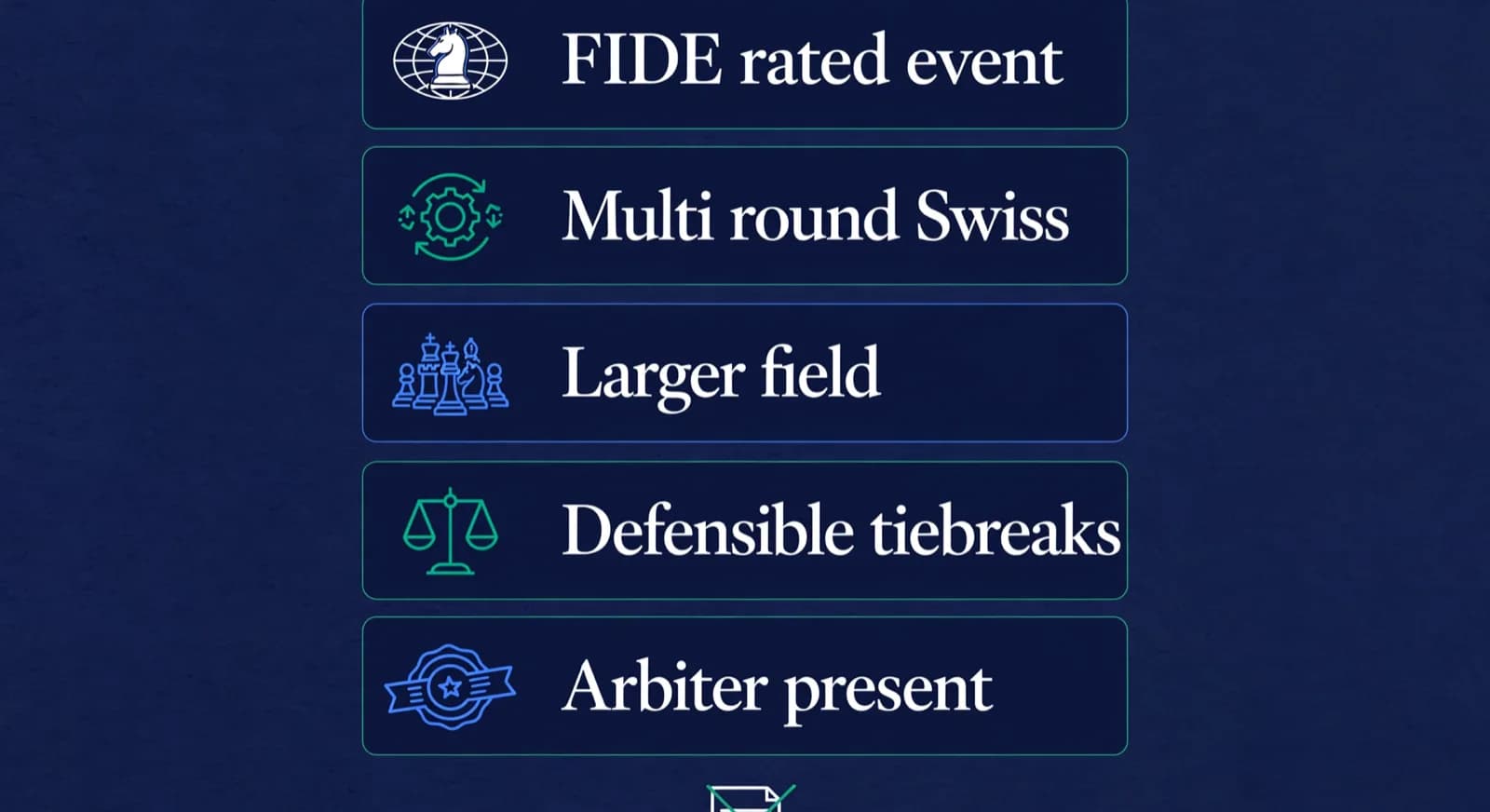
The clearest triggers for reaching for a dedicated pairing program are concrete. Match your event against this list before you decide a spreadsheet is enough.
- The event is FIDE-rated or affiliated with a federation, so pairings and tiebreaks must follow the published regulations [16].
- You are running a Swiss system with more than three or four rounds, where manual pairing errors compound quickly [19].
- The field is larger than about a dozen players, past the point where a round-robin grid is practical.
- You need defensible, reproducible tiebreaks because prizes, norms, or qualification depend on the exact final order.
- An arbiter is present who expects standard pairing output they can verify and sign off.
If none of those apply, dedicated pairing software is probably more than the event needs, and its narrow scope becomes a drawback: it will run your bracket beautifully and then leave you to handle entries, fees, and parent messages somewhere else. That somewhere else is the gap academy software fills. For a pre-rated try, our free round 1 pairing generator covers the first-round grid without pretending to be a rated Swiss engine, and for the time-control decisions that sit alongside the pairing choice our guide to tournament time controls goes deeper.
What does an AICF or FIDE-rated event in India actually require?
For a rated event the pairings and tiebreaks have to be defensible to the arbiter and the federation, which in practice means a program the arbiter already trusts. FIDE publishes the pairing systems (Dutch, Dubov, Burstein and Lim) effective from 1 February 2026 and the tie-break regulations effective from 1 March 2026, both in the FIDE Handbook [16], and any serious pairing tool implements one of those systems.
On 2026-08-12 we checked aicf.in for a published AICF software requirement for rated events and did not find a page that mandates a specific program by name [18]. The federation site lists calendars, arbiter information and event circulars, but not a software mandate page that we could locate. That matters because the rule we can state honestly is negative: AICF does not appear to publish a single required program, so your confirmation step is your state association and the chief arbiter assigned to the event, not a software shopping list.
FIDE does publish a Tournament Handler Programs table. The chapter FIDE Certified and Endorsed Equipment, applied from 1 March 2026, lists each program's name, version, pairing system, endorsed flag, expiry date and the event where it was tested [24]. As of 16 October 2026 the table listed Vega 7.6.0, SwissSys 9.6, SwissMaster 5.7, Swiss-Manager 13, ChessManager and Tornelo among others, every row flagged endorsed but every expiry date reading 2026/02/01, a date that has already passed [24]. A listing with a past expiry is a historical record, not proof that the version you download today is currently endorsed. The expiry field is on the page for exactly that reason, so ask your chief arbiter which listed program and version they will accept for your event rather than treating any row as a live certificate.
| Program on FIDE table | Version listed | Expiry on table | Rating-report / export note |
|---|---|---|---|
| Swiss-Manager | 13 [24] | 2026/02/01, passed [24] | Feeds chess-results.com; the export file is the arbiter question [1][15] |
| Vega | 7.6.0 [24] | 2026/02/01, passed [24] | Download page: Windows/Mac free to 20 players; Linux free unlimited; JaVaFo needs JRE 7+ [4] |
| SwissSys | 9.6 [24] | 2026/02/01, passed [24] | Desktop licence; confirm the current export format with the arbiter [5] |
| ChessManager | version blank [24] | 2026/02/01, passed [24] | Free tier includes TRF export; Premium adds PGN, CSV, Excel [8][9] |
| Tornelo | version blank [24] | 2026/02/01, passed [24] | Browser platform; the rated-event export is an arbiter question [11] |
Which programs support FIDE-rated pairings and rating-report exports? The FIDE table is the public list of historically endorsed tournament handler programs and versions [24]. TRF export is published on ChessManager's free tier [8]. Vega's download page documents OS-specific free limits and the JaVaFo Java requirement [4]. Swiss-Manager's own site describes simple publishing of tournaments to chess-results.com [1]. Confirm the exact file your chief arbiter and state association will accept before you buy a licence.
Can software handle registration, payments and standings together? Yes, on some web platforms. As of 2 October 2026, TournaChess's homepage sells online registration, Stripe payments, live pairings and standings on one site, free for tournaments up to 16 players [25]. ChessHost's pricing page lists QR code self-registration and automatic pairings and standings on its free plan [14]. ChessManager Premium lists collect entry fees as an extra, with a published 2 percent processing fee on top of Stripe or PayPal fees [9].
Keep the different kinds of compliance apart, because a single word like compliant hides them. A program's pairing engine can implement the FIDE Dutch rules (JaVaFo and bbpPairings are the engines named against most rows on the FIDE table [24]), which is separate from whether its results export is the file your arbiter will submit, which is separate again from how it collects entry-fee payments. Swiss-Manager's own site describes publishing to chess-results.com [1]; ChessManager documents TRF export on its free tier and PGN, CSV and Excel on Premium [8][9]; Tornelo and ChessHost are browser platforms whose rated-event export is a question for your arbiter [11][14]. For parent communication specifically, none of the eight pairing tools documents a parent-messaging feature on its own site, so treat that layer as not established in a pairing program and handle it elsewhere.
In practice for India, the operational layer is this. First, confirm with your state association whether the event will be FIDE-rated and who will be chief arbiter. Second, ask that arbiter which program they will accept for pairing and tiebreak files and in which export format, usually TRF or the Swiss-Manager export that feeds chess-results.com [1][15]. Third, keep your publishing plan separate: chess-results.com is where results are searched and archived after the event, not the tool that generates the pairings [15]. That sequence avoids buying a licence that your arbiter will not sign off.
Where does academy software fit in running events?
Academy software can now run the bracket too. ChessCore pairs Swiss, round robin, knockout, arena and team events, shows live standings with Buchholz and Sonneborn-Berger tiebreaks, takes entries and fees, and records each result on the player's profile, so the event connects to the rest of your academy. For a FIDE-rated event, check which pairing programs your federation accepts before you choose.
This matters most for a club's own internal events: a monthly rating tournament, an inter-batch championship, a summer-camp Swiss. For those, the pairing runs in a lightweight pairing tool or online, but the work that actually eats an organizer's time is off the board. Who entered, who paid the entry fee, which batch each child belongs to, what their result was, and how you tell twenty parents how their child did that weekend. In Demo Chess Academy, a made-up academy, when Batch B2 runs an internal event, Coach Elena records each result against the student's profile so the rating history updates in one place, and the entry fee is collected with a receipt rather than a cash tally. That is the academy layer, and it persists after the tournament is over.
Lucas M.
Batch B2 · Thursdays · joined Aug 2025
1342
Academy rating · Lichess games synced
Won vs. 1410 · French Defense
Best gameMissed fork on move 23
Homework setThere is a clear boundary between this post and our academy software topic. This post is about the software for running tournaments and where each category fits; the full evaluation of academy management platforms, including everything unrelated to events, belongs in our guide to chess academy management software. If your question is which platform runs your academy day to day, read that; if your question is what runs your tournament, stay here. ChessCore appears in this comparison as academy software that also runs your own events: pairings, standings, entries, fees and communication in one place.
One boundary matters for rated play. A FIDE-rated event needs a pairing program endorsed for FIDE's Swiss rules [16], and your federation decides which ones it accepts; for club, academy and school events, ChessCore's own pairings, standings and TRF16 export cover the whole event.
How are results, standings, and tiebreaks handled across the three?
Results entry and tiebreaks are handled automatically by dedicated pairing software and manually by spreadsheet formulas; academy software stores the finished result once the pairing tool has produced it. This is the row of the comparison people most often get wrong, because entering a result and ranking the field are two different problems.

In a dedicated pairing program, you enter each board's result and the software immediately updates scores, applies the FIDE-endorsed tiebreak order, and generates the next round's pairings from the new standings [16]. That closed loop is the whole value: results drive pairings drive standings with no manual step to get wrong. In a spreadsheet you rebuild that loop yourself with formulas, which is workable for a fixed round-robin and fragile for a Swiss. Online platforms handle the loop internally and simply publish the table [21]. Whichever you use, the games themselves can be exported as PGN, so a result captured during the event can be moved into analysis or into a student's record afterward without retyping [20].
Academy software sits at the end of that chain. You compute who finished third on tiebreak in the pairing program or on the playing platform; once the final standings exist, an academy platform records each player's result and score against their profile, so the tournament becomes a data point in the season rather than a printout that gets lost. If your events feed official ratings, the federation side of that (registration and rated-event submission) runs through your national body and FIDE, not through any of these tools directly [17]. Our tools section also includes a Swiss rounds calculator for the planning step of working out how many rounds a field size needs.
How do you choose the right tournament software for your event?
Choose by answering two questions in order: is the event rated or officially ranked, and how big is it. If it is rated, you need dedicated pairing software, full stop [16]. If it is not rated but larger than a round-robin can handle, you still want a pairing tool or an online platform to run the bracket. If it is small and internal, a lightweight pairing tool, an online event or even a spreadsheet covers the pairing, and academy software covers the entries, fees, records and parent updates around it.
Before you commit to a program for a rated event, run a short acceptance check yourself. This is a test for you to perform, not testing we have done for you, and it takes one evening with a dummy tournament.
- Confirm with your chief arbiter the exact program and version they will accept, and install that version.
- Enter six to eight dummy players and pair two or three rounds so you see a real score-group split.
- Record a withdrawal and a requested bye, and check the next round pairs correctly around them.
- Export the results file your arbiter named (usually a TRF file or the Swiss-Manager export) and open it to confirm it is well formed.
- Confirm where that file is submitted (the arbiter, the state association or chess-results.com) before the event, not on the day.
For most academies the honest recommendation is to split the job: an endorsed pairing program for any FIDE-rated bracket, a pairing tool or playing platform for the internal Swiss, the inter-batch round-robin and the camp knockout, and academy software for the entries, fees, records and parent updates in one place. Buying only a pairing program is how organizers end up with a great bracket and a chaotic entry list; asking a spreadsheet or an unendorsed tool to run a rated event is how they end up with a disputed result. Decide whether each event is rated before you open any tool, and the right choice follows.
Translate that rule into names. For a club Swiss of 20 players that is not rated, ChessPairings.org or a Vega free tier handles the bracket without a purchase and you can trial both in an afternoon [3][10]. For a school event of 300 that is not rated but needs fast sign-up and a projector, ChessHost's QR flow and live display fits, though the free plan stops at 12 players, so a full field needs ChessHost Pro, which removes the player limit [14]. For a district rated Swiss of 120 where the arbiter expects TRF exports to chess-results.com, Swiss-Manager's full 150 EUR licence or Vega is the safer desktop answer because the light licence caps Swiss events at 60 players and arbiters know those outputs [1][15]. For a weekly online club night, skip the install entirely and run the Swiss on a playing platform, then record the finished scores into your academy records afterward.
Whatever you pick, estimate how long your event will run before you publish the schedule. Our tournament time planner helps with that estimate, and our pillar guide on organizing a chess tournament ties the software choice into the full event plan, from entry form to final standings. You can also see how the academy layer works in a live walkthrough.
Frequently asked questions
Which programs support FIDE-rated pairings and rating-report exports?
FIDE's Certified and Endorsed Equipment chapter, applied from 1 March 2026, publishes a Tournament Handler Programs table with version and expiry fields [24]. On 2026-10-02 that table listed Swiss-Manager 13, Vega 7.6.0, SwissSys 9.6, ChessManager and Tornelo, several with expiry 2026/02/01 [24]. ChessManager's free tier includes TRF export [8]. Confirm the file your arbiter wants (TRF, Swiss-Manager export, or another format) before the event. A listed historical version is not automatic proof the build on your laptop is current.
Can I run a chess tournament in Excel or a spreadsheet?
Yes, for a small internal event, especially a round-robin where everyone plays everyone and the pairings are fixed in advance. A spreadsheet handles the grid and the standings fine at that size. It breaks down for the Swiss system, where pairings change after every round based on running scores and colour balance, because the spreadsheet does not know the rules and you become the pairing engine. For anything rated or beyond a handful of rounds, use dedicated pairing software instead.
Is there free chess tournament software?
Yes, and the free options are named on their own sites. ChessPairings.org says it has no paid tier and follows FIDE 2026 rules [10], Vega is free up to 20 players on Windows and macOS and has no player or round limits on Linux [4], ChessHost gives every account one free event a month of up to 12 players [14], and Tornelo says it is free to use, always [12]. SwissSys offers a free trial for up to two rounds [5], and ChessManager has a free tier, with Premium listed at $97 per year on its homepage and $49 per year on its Premium page on 2026-10-02 [8][9]. Check each site on the date you buy.
Which chess tournament software is free to download?
ChessPairings.org is free in the browser and as a Windows 10 and 11 desktop app from the Microsoft Store [10]. Vega and VegaTeam for Windows can be downloaded and used free up to 20 players; on macOS Vega is free up to 20 players and VegaTeam up to 6 teams; and the Linux Vega has no limits on rounds or players [4]. JaVaFo needs Java 7 or later only if you use that pairing engine [4]. ChessHost runs in the browser with no download and a free monthly event [13][14], Tornelo says it is free to use [12], and SwissSys offers a free trial with full functionality for up to two rounds [5]. Swiss-Manager's download runs as a demo until you apply a purchased installation code [23].
How does ChessCore fit into running a tournament?
ChessCore runs the event itself: Swiss, round robin, knockout, arena and team pairings, live standings with tiebreaks, entries and fees, parent updates, and each result on the student's profile so the rating history stays current. For a FIDE-rated event, check which pairing programs your federation accepts; ChessCore exports the TRF16 rating report.
Can chess tournament software handle registration, payments and standings together?
Some web platforms can. As of 2 October 2026, TournaChess's homepage offers online registration, Stripe payments, pairings and standings, free for tournaments up to 16 players [25]. ChessHost's free plan includes QR code self-registration and automatic pairings and standings in the browser [14]. ChessManager Premium lists collect entry fees with a 2 percent processing fee on top of Stripe or PayPal fees [9]. Academy software still owns persistent student records after the event ends.
Sources
- [1]Swiss-Manager official site and prices · accessed 2026-10-02
- [2]Vega home page · accessed 2026-08-12
- [3]Vega registration and prices per system · accessed 2026-08-12
- [4]Vega download and free limits · accessed 2026-10-02
- [5]SwissSys on ChessRoster · accessed 2026-10-02
- [6]WinTD program information · accessed 2026-08-12
- [7]WinTD prices and ordering information · accessed 2026-08-12
- [8]ChessManager home · accessed 2026-10-16
- [9]ChessManager premium and pricing · accessed 2026-10-16
- [10]ChessPairings.org free tournament software · accessed 2026-10-02
- [11]Tornelo home · accessed 2026-08-12
- [12]Tornelo services and pricing · accessed 2026-10-02
- [13]ChessHost home · accessed 2026-10-02
- [14]ChessHost pricing · accessed 2026-10-02
- [15]Chess-Results.com tournament database · accessed 2026-08-12
- [16]FIDE Handbook Swiss rules and tiebreak regulations · accessed 2026-10-16
- [17]FIDE International Chess Federation · accessed 2026-08-12
- [18]All India Chess Federation · accessed 2026-08-12
- [19]Swiss-system tournament · accessed 2026-08-12
- [20]Portable Game Notation · accessed 2026-08-12
- [21]Lichess API and tournaments · accessed 2026-08-12
- [22]SwissSys order page · accessed 2026-08-12
- [23]Swiss-Manager download and demo · accessed 2026-10-02
- [24]FIDE Certified and Endorsed Equipment (effective 1 March 2026) · accessed 2026-10-16
- [25]TournaChess: registration, payments, pairings and standings · accessed 2026-10-02
Written by Abhishek Tiwari
ChessCore
Drafted with AI, fact-checked and approved by a human before publishing, the same guardrail our product applies to every report it sends. Read our editorial standards.
Keep your academy events in ChessCore
Run the pairings, standings, entry fees, schedules and parent updates for your academy events in ChessCore. See it in a live walkthrough.
- Roster import from the spreadsheets you already keep
- Lichess and Chess.com connections, batches, and fee plans
- First reports in week one, after your approval
- Free plan, no credit card required