On this page8 sections, 15 min read
- How to test Chessify against your own setup
- What is Chessify?
- What does cloud engine analysis give you over local analysis?
- Who actually needs that depth?
- Is Chessify free, and what do the paid plans cost?
- What are the alternatives to Chessify?
- ChessBase vs Chessify: which should you pick?
- Where does Chessify fit next to academy software?
- Frequently asked questions
Bottom line
Chessify is a cloud engine analysis platform with web, iOS, Android, and ChessBase plugin access. Its official pages list free shared analysis on a 16-thread server, paid plans with stronger shared servers, and Coins from $25 that rent dedicated servers up to 1,000 MN/s for Stockfish 18. Most club players and coaches can start free; the paid tiers suit deep preparation work.
TL;DR
- Chessify sells access to shared and dedicated cloud chess engines without requiring the user to own comparable hardware.
- The free account includes unlimited cloud analysis with the latest Stockfish on a shared 16-thread server, according to Chessify's July 2026 platform update.
- The strongest documented use cases are deep opening preparation, correspondence analysis, and other positions where faster analysis has practical value.
- Chessify serves coaches for analysis; ChessCore serves academies for operations. A serious coaching business might use both, and they do not compete.
Key facts
- Chessify's published tagline is "The No. 1 Cloud Platform for Online Chess Engine Analysis".[1]
- Chessify lists Stockfish 18 dedicated servers at up to 1,000 MN/s, with actual performance varying by position and engine version.[7]
- Chessify's July 2026 update says the free account includes unlimited latest-Stockfish analysis on a shared 16-thread server across its unified web and mobile platform.[8]
- Chessify's current pricing page lists a 10M+ professional-games database, a 2M+ ICCF database on higher plans, Syzygy tablebases, and a ChessBase plugin integration.[6]
- Stockfish itself is free and open source, and runs locally on ordinary hardware.[2]
How to test Chessify against your own setup
This review reports what Chessify documents on its own pages and where academy operations sit outside the product; it does not benchmark server speed, test billing, or open a paid account, so the fit judgments are editorial reads of the documented product, retrieved on 16 October 2026 [1][6][7][8]. That holds for every section and is not repeated in each one. The honest way to settle whether cloud depth helps your work is to run the same position twice and compare, so the steps below are a test you can run yourself rather than a score we assign.
Pick one position that your current setup struggles with and paste the same FEN into local Stockfish and into Chessify. Hold everything comparable: the same engine version, the same network, and matched threads, hash, and MultiPV where both tools expose them. Run each for the same elapsed time, then write down the depth or node count reached and, more importantly, whether the two results change the move you would actually play or teach. Disclose any setting you could not match, because an unmatched thread count or hash size changes the comparison.
- Choose one FEN your laptop cannot resolve in the time you have.
- Set the same engine version, threads, hash, and MultiPV on both sides, or note which you could not match.
- Run local Stockfish and Chessify for the same elapsed time on the same network.
- Record depth or nodes reached on each, and the move each one leads you to.
- Keep Chessify only if the cloud result changes a decision, not only the waiting time.
What is Chessify?
Chessify is a cloud platform for chess engine analysis. Its homepage calls it "The No. 1 Cloud Platform for Online Chess Engine Analysis" [1]. A separate official Stockfish 18 page lists shared server speeds from 1 MN/s on Free to 25 to 100 MN/s on Master and GM, plus coin-based dedicated servers from 130 to 1,000 MN/s [7]. Chessify says actual performance varies with the position and engine version. The available engines include Stockfish, Leela Chess Zero, asmFish, SugaR, Berserk, and others [1][8].
The current product also includes a web analysis board, cloud storage, a 10M+ professional-games database on paid tiers, a 2M+ ICCF database on higher tiers, Syzygy tablebases, and a ChessBase plugin [6]. Chessify unified its web and mobile accounts in July 2026, so one subscription and cloud-stored PGN library now work across the website, iOS, and Android [8]. Its official site says more than 300 grandmasters use the platform [1].
Getting a position into Chessify is worth separating from analysing it, because the mobile app lists three different input routes [9]. Camera input is the chess scanner: upload an image or take a direct photo of a board, which the app says works for a printed, digital, or a real board, with a PDF reader that scans the diagrams in a chess book and saves them as PGN [9]. PGN upload is the second route, moving an existing game file into the cloud library that syncs across web and mobile [8]. Database search is the third, querying the professional-games database on paid tiers rather than entering a position by hand [6]. Match the route to where the position lives now: a photo for a printed study, a PGN for a game you already have, a database query for a known line.
What does cloud engine analysis give you over local analysis?
Cloud analysis primarily buys access to more computing capacity without requiring comparable local hardware. Stockfish itself is free and open source [2], while Chessify sells shared and dedicated server access at documented thread counts and approximate speeds [6][7]. Chessify's Stockfish 18 page lists the shared tiers at about 1 MN/s on Free, 10 MN/s on Amateur and 25 to 100 MN/s on Master and GM [7].
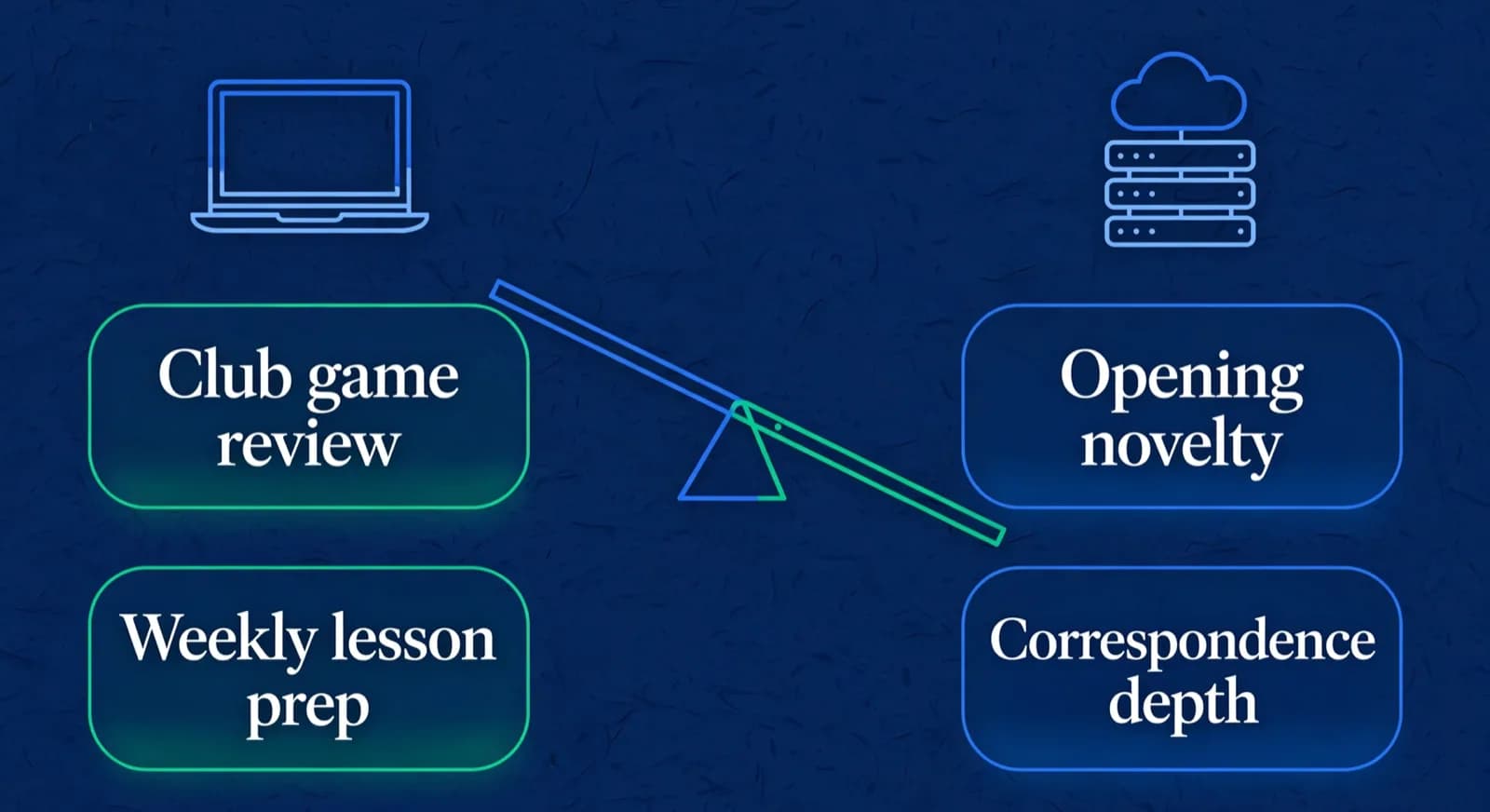
Chessify names critical positions, deep opening preparation, correspondence chess, and maximum-speed analysis as uses for its dedicated servers [8]. Those are tasks where additional compute may be useful. The benefit depends on the user's local hardware, engine settings, position, and deadline.
| Task | Local Stockfish on a laptop | Cloud engines (Chessify) |
|---|---|---|
| Reviewing a club player's game for blunders | Completely sufficient | Overkill |
| Weekly lesson prep for students | Completely sufficient | Overkill |
| Verifying an opening novelty at high depth | Depends on local hardware and settings | Dedicated servers listed from 130 to 1,000 MN/s [7] |
| Correspondence depth analysis of a critical line | May be slow on limited hardware | A use case Chessify documents for dedicated servers [8] |
| Endgame verification | Fine with local tablebases | 6 piece Syzygy included [1] |

Lucas M. vs. Hana K.
Rapid · synced from Lichess · Tue 7:42 PM
14...Qe6? drops the knight
Eval swings +2.1 · the move to review first
Missed fork on move 23
Same pattern as last Tuesday · drill it
Endgame conversion was clean
Won vs. 1410 · French Defense
Who actually needs that depth?
Chessify's own materials point most clearly to serious preparation work. The July 2026 platform guide names critical positions, deep opening preparation, correspondence chess, and situations requiring maximum speed as uses for dedicated servers [8]. Titled players, tournament players with maintained repertoires, correspondence players, and coaches preparing difficult lines are plausible fits.
Club players and students should start by testing the free options. Local Stockfish is free [2], Lichess provides free study boards [3], and Chessify's free account includes a shared 16-thread Stockfish server [8]. A paid plan becomes easier to justify when a real preparation task is constrained by available compute, storage, database access, or time. Without that constraint, a larger server number may not improve the study routine.
Coaches sit between those cases. Routine lesson review may work with local or free analysis, while a difficult repertoire file or a deadline-driven preparation task may benefit from faster cloud servers and a larger database. The decision should come from the work: identify the position or workflow that the current setup cannot handle, then test whether Chessify removes that constraint during the free path or Amateur trial.
Server speed is not the same as study value. Chessify itself notes that actual NPS varies by position and engine version [7]. Before paying, record the task, current waiting time, analysis depth or node count, and the decision the result must support. If the paid server changes none of those outcomes, more capacity is not solving the current problem.
Is Chessify free, and what do the paid plans cost?
Yes. Chessify's free account includes a shared 16-thread server, one PGN storage slot, standard engines including Stockfish, and Syzygy tablebase access [6][8]. It excludes the professional-games database, ICCF database, video search, and unlimited Lc0 GPU access listed on paid tiers [6]. The official pricing FAQ also offers a 7-day free trial of the Amateur plan, with no card required and nothing charged, available once per account; the trial simply ends after 7 days unless you choose a plan [6].
The pricing cards load their subscription amounts dynamically, but the pricing FAQ gives two in a worked upgrade example: moving from "the $8 Amateur plan to the $35 Master plan" halfway through a monthly period costs an extra $13.50, made of a $4 credit for unused Amateur time and $17.50 for the rest of the Master month [6]. Treat $8 and $35 as the FAQ's example monthly figures, retrieved on 16 October 2026, and confirm the card at checkout. The page offers monthly and yearly billing, with yearly saving two months, and lists a Super GM plan at $15,000 a year that includes 6 million Coins [6]. Prices exclude VAT, which may apply by location [6].
| Plan or path | Cost, per the official pricing page | What free vs paid unlocks |
|---|---|---|
| Free registration | No subscription | 16 server threads, 1 PGN, core engines, Syzygy [6] |
| Amateur trial | 7 days free, no card required, once per account | Full Amateur features during the trial; it simply ends after 7 days unless you choose a plan [6] |
| Amateur | $8 a month in the pricing FAQ's example [6] | 32 threads, 500 PGN, video search, pro games database [6] |
| Master | $35 a month in the pricing FAQ's example [6] | 128 threads, unlimited PGN, full databases, GM bonus call [6] |
| GM | Not shown in the FAQ; confirm on the card [6] | Master features plus unlimited GPU LCZero access [6] |
| Coins / Super GM | Coins from $25; Super GM $15,000 yearly with 6 million Coins [6] | Dedicated high-thread servers and top package access [6] |
Coins are the second way to pay. They rent dedicated servers by the minute, from 10 Coins a minute for a 130 MN/s Stockfish server to 80 Coins a minute for 1,000 MN/s [7]. Larger packs carry bonus Coins, and every pack is valid for six months [6]:
| Coin pack price | Coins | Bonus Coins | Total Coins |
|---|---|---|---|
| $25 | 2,500 | None | 2,500 |
| $100 | 10,000 | 1,000 | 11,000 |
| $500 | 50,000 | 10,000 | 60,000 |
| $1,000 | 100,000 | 20,000 | 120,000 |
The arithmetic, using the smallest pack: $25 buys 2,500 coins with no bonus, and the dedicated Stockfish servers are charged per minute of use [6][7]. At 80 coins a minute for the 1,024-thread server that Chessify rates near 1 BN/s, 2,500 coins cover about 31 minutes, since 2,500 divided by 80 is 31.25 and a part-minute still spends a whole minute's coins. At 10 coins a minute for the 128-thread dedicated server, the same 2,500 coins cover about 250 minutes. Every pack is valid for six months, and buying more coins extends the whole balance to six months from that purchase, so unused coins are not lost at month end but do expire if left for half a year [6]. For the query "is Chessify free", the answer stays yes: the free account covers shared cloud analysis, and the money only starts when a task needs more threads, databases, storage or dedicated servers.
What are the alternatives to Chessify?
For most readers the alternative is simpler than a competing cloud: it is not paying for depth at all. Local Stockfish is free, open source, and more than sufficient for game review and lesson preparation [2]. Lichess, which is free and run as open source [5], provides server analysis and shared study boards that cover the whole coaching workflow of annotating and discussing games with students [3]. For players embedded in the professional preparation world, the ChessBase ecosystem is the incumbent, with its own database tooling and engine cloud [4], and Chessify even ships a plugin into it [1].
- Local Stockfish: free, open source, sufficient for review and lesson prep [2].
- Lichess studies and server analysis: free, collaborative, ideal for coaching workflows [3].
- ChessBase ecosystem: the professional incumbent for databases and preparation [4].
- Chessify: rented depth on demand when the work genuinely consumes it [1].
If you are weighing the ChessBase route against lighter tooling, our ChessBase alternatives guide goes deeper on that decision, and the engine analysis for chess coaching pillar covers how much depth coaching work actually needs. For the player side of the tool market, start from the best AI chess training apps roundup, and see our Aimchess review for the analytics end of that spectrum.
ChessBase vs Chessify: which should you pick?
Pick by the bottleneck, not the brand, because ChessBase and Chessify do different jobs. ChessBase is a Windows-first desktop database suite sold as one-time packages for curated offline preparation [12]. Chessify is browser cloud engine rental on a subscription, built for rented depth on a deadline [1]. Choose ChessBase when the stuck task is searching and organising curated game collections; choose Chessify when the stuck task is engine depth per unit of time that a laptop cannot finish before a round. Many strong players eventually touch both, and Chessify documents its cloud engines running inside third-party desktop programs including ChessBase, Fritz and Aquarium [14].
The cost structures are not like-for-like, so compare them in their own currencies. As of 16 October 2026 the ChessBase shop listed ChessBase '26 as a Single Program at EUR 199.90, a Starter Package at EUR 249.90, a Mega Package at EUR 349.90, and a Premium Package at EUR 499.90, with Windows 10 or higher as the stated system requirement [10][11]. The Single Program ships the program plus a one-year membership rather than the full Mega Database, which comes with the Mega Package or as its own purchase [10]. Chessify's side is the Free tier plus the FAQ's example subscriptions of about $8 a month for Amateur and $35 for Master, with Coins from $25, all retrieved on 16 October 2026 [6]. A one-time euro outlay is not automatically cheaper than a monthly dollar plan: amortise the ChessBase version across the years you keep it, then weigh it against the months you actually rent cloud depth.
| Buying path | ChessBase (shop, 16 Oct 2026) | Chessify (pricing page, 16 Oct 2026) |
|---|---|---|
| Entry or free path | No free full program; paid packages only [10] | Free tier: 16 threads, core engines, 1 PGN slot [6] |
| Core paid tier | Single Program EUR 199.90 [10][11] | Amateur, 32 threads, about $8 a month in the FAQ example [6] |
| Mid package | Starter EUR 249.90; Mega EUR 349.90 [10] | Master, 128 threads, about $35 a month in the FAQ example [6] |
| Top published package | Premium Package EUR 499.90 [10] | GM tier plus Super GM at $15,000 yearly [6] |
| Platform note | Windows 10 or higher on product requirements [10] | Browser-first cloud; no Windows license needed [6] |
Platform fit decides this for Mac and Linux coaches. ChessBase product requirements on the shop list Windows 10 or higher, so a Mac user today needs a Windows environment or a free cross-platform database tool, while Chessify runs in a browser [10]. ChessBase announced a native Mac release for November 2026 in a 27 September 2026 news post, so re-check the shop once that version ships [13]. For most club coaches the honest first move is neither paid tool: free Lichess studies handle chapter-based repertoires and lesson material, and local Stockfish covers the engine truth for almost every club lesson [3][2]. Buy Chessify when a strong student's critical line needs depth the laptop cannot finish in time; buy ChessBase when weekly billable work is opponent preparation from large curated collections and you want that research inside one desktop program [10][12].
Where does Chessify fit next to academy software?
They solve different bottlenecks, which is worth stating plainly because both sell to coaches. Chessify serves coaches for analysis: engine depth, databases, preparation files. Academy software, ChessCore included, serves academies for operations: batches, attendance, fee collection, parent updates, and student records; disclosure, ChessCore publishes this review. The one place the layers touch is student game review. ChessCore imports students' public games from Lichess and Chess.com, read-only, about every hour, runs Stockfish on the games a coach picks, and holds AI-drafted feedback until a coach approves it, while routine class and fee reminders send automatically, with class reminders going out 24 hours and 2 hours before a class. That is ChessCore product behavior, not a claim about Chessify, and it is a different job from the deep cloud analysis weighed against ChessBase in the comparison section above. Nothing about one tool replaces the other.
Week of 12 October · all batches
0 conflictsMake-up credit · Mia G. · Sat 4:30 PM
Absent Thursday with notice · booked by Noor
Class reminders sent to 148 families
Timing changes update everyone at once


Frequently asked questions
Is Chessify free?
Yes for basic use. Free registration grants cloud engine analysis, with a Free plan that includes 16 threads, one PGN storage slot, core engines including Stockfish, and Syzygy tablebase access, per chessify.me. Paid Amateur, Master, and GM plans add threads, storage, databases, and GPU access. There is also a 7-day free trial of the Amateur plan, with no card required and nothing charged, available once per account. For permanent zero cost, free Chessify analysis plus local Stockfish or Lichess server analysis covers most club needs.
How long is the Chessify free trial?
On 16 October 2026, Chessify's pricing FAQ stated the free trial of the Amateur plan lasts 7 days. It requires no card and nothing is charged; the trial simply ends after 7 days unless you choose a plan, and it is available once per account. During the trial you get unlimited analysis with multiple engines, including Stockfish, Berserk, and Koivisto, on a 32-thread shared server, the same server tier Amateur subscribers get after the trial ends.
Is Chessify worth it for a club player?
Start with Chessify's free 16-thread server, local Stockfish, or Lichess studies before paying. A paid plan is easier to justify when a specific preparation task needs more shared threads, cloud storage, database access, Lc0, or dedicated server capacity. Test one real task during the free path or Amateur trial before you buy.
What engines can you run on Chessify?
Chessify's official pages list Stockfish 18, Leela Chess Zero, CorChess, asmFish, SugaR AI, Berserk, Koivisto, RubiChess, ShashChess, Caissa, Crystal, Patricia, and Viridithas. Dedicated Stockfish servers are listed up to 1,000 MN/s, with actual performance varying by position and engine version. The current pricing page also lists Syzygy tablebases and a 10M+ professional-games database.
Is Chessify good for chess coaching?
Chessify may fit coaches who need cloud engine capacity, professional and correspondence databases, cloud PGN storage, or a ChessBase plugin for preparation. Routine review may also fit the free account. Compare one real preparation task on your current setup and on the Chessify trial before paying.
Which is cheaper, ChessBase or Chessify, and which should I pick?
It depends on how you amortise the cost, because they are different categories. ChessBase '26 packages on the shop range from about EUR 199.90 for the Single Program to EUR 499.90 for Premium as one-time prices, and the product requires Windows 10 or higher. Chessify has a real Free tier, with FAQ examples of Amateur around $8 a month and Master around $35 a month, plus Coins from $25. Occasional depth favours Chessify Free, Coins or a short subscription; daily multi-year database work can favour a one-time ChessBase package. Academy operations, students, fees and parent updates, sit outside both and need ChessCore-style academy software instead.
Sources
- [1]Chessify: official site, features and pricing · accessed 2026-10-16
- [2]Stockfish: open-source chess engine · accessed 2026-08-30
- [3]Lichess studies: shared analysis boards · accessed 2026-08-30
- [4]ChessBase: official site · accessed 2026-08-30
- [5]Lichess: official about page · accessed 2026-08-30
- [6]Chessify subscription plans and Coins · accessed 2026-10-16
- [7]Stockfish 18 is live on Chessify Cloud · accessed 2026-10-16
- [8]One Chessify account across web and mobile · accessed 2026-10-16
- [9]Chessify mobile app: chess scanner and analysis · accessed 2026-10-16
- [10]ChessBase 26 packages and prices, official ChessBase shop · accessed 2026-10-16
- [11]ChessBase '26 Single Program, official ChessBase shop · accessed 2026-10-16
- [12]Wikipedia: ChessBase · accessed 2026-10-16
- [13]ChessBase news: ChessBase finally on Mac · accessed 2026-10-16
- [14]Chessify: engines usable in third-party GUIs including ChessBase · accessed 2026-10-16
Written by Abhishek Tiwari
ChessCore
Drafted with AI, fact-checked and approved by a human before publishing, the same guardrail our product applies to every report it sends. Read our editorial standards.
Deep analysis sorted? Fix the operations side next
Chessify rents you engine depth. ChessCore runs the academy: Stockfish review on synced student games, AI report drafts a coach edits before sending, attendance and fees in one place. See both layers in a demo.
- Roster import from the spreadsheets you already keep
- Lichess and Chess.com connections, batches, and fee plans
- First reports in week one, after your approval
- Free plan, no credit card required