
On this page8 sections, 15 min read
- Which is better, ChessPlay or CircleChess?
- What is ChessPlay?
- What is CircleChess?
- How do ChessPlay and CircleChess compare side by side?
- What jobs should an academy owner compare ChessPlay against?
- What should you test on a trial before deciding?
- Where does ChessCore fit for an academy owner?
- How do you turn this into one decision?
- Frequently asked questions
Bottom line
ChessPlay and CircleChess are different products, so match the one you buy to the job you have. ChessPlay is chess academy management software for coaches; its pricing page listed $99 USD a month on 16 October 2026. CircleChess splits by job: Caissa School of Chess for coaching a child, the Caissa App for practice, and a tournament manager for organising. Decide whether you run coaches, buy lessons or run events.
TL;DR
- ChessPlay is chess academy management software for coaches; CircleChess is a chess company with separate products for learning, practice and tournaments, so the two are not interchangeable subscriptions.
- On 16 October 2026, ChessPlay listed $99 USD a month for unlimited students, coaches and branches; CircleChess sells coaching through Caissa School of Chess with published course plans priced in rupees, not a software licence.
- The right pick follows the job: an owner choosing tools for their own coaches wants ChessPlay's category, a parent buying lessons for a child wants Caissa School of Chess, and an organiser wants CircleChess's tournament manager and events database.
- A coaching course fee and a software subscription are not comparable products, so compare costs only within the job you are buying for.
Key facts
- ChessPlay is chess academy management software covering classrooms, attendance, fees, tournaments, and parent reports, built for coaches and academies rather than for a single learner.[1]
- ChessPlay charges one flat fee, $99 USD per month, for unlimited students, coaches, and branches, with no per-student scaling.[3]
- CircleChess runs several distinct chess products: a tournament manager called Chessmaster for organisers, Caissa School of Chess for live online coaching, the Caissa App for practice, and CircleChess Events, which it calls the largest tournament database in India.[2]
- CircleChess sells its Caissa School of Chess coaching as fixed course plans, for example a 3-month beginner plan at Rs 9,000 and a 12-month plan at Rs 34,440 on 16 October 2026, with 2 live classes a week, not a monthly software licence.[4]
- ChessCore is chess-specific academy management software in the same category as ChessPlay, covering scheduling, attendance, fee collection, game review, parent reporting, and an AI copilot whose drafts wait for a person's approval.
- ChessPlay's pricing FAQ says schools, public chess programs and registered non-profits qualify for special pricing on request.[3]
Which is better, ChessPlay or CircleChess?
Neither is better in the abstract, because they are built for different jobs. ChessPlay is academy management software: a coach or academy owner uses it to run classes, track attendance, collect fees and send parent reports [1]. CircleChess is not one product but a set of them, so the honest comparison depends on which job you have [2]. If you are equipping your own coaches to run an academy, ChessPlay is the relevant category. If you are buying lessons for a child, CircleChess's Caissa School of Chess is the relevant product. If you are organising a tournament, CircleChess's Chessmaster tournament manager and its events database are what you would look at. Those are three separate purchases, not one ranking.
All of these involve chess and software, but your role sets the contractual question you need answered. As an owner you are signing a recurring software subscription, so ask about per-tier limits, billing period and what the base price actually includes. As a parent you are buying a fixed-length coaching course, so ask how many classes, which coach, and what happens if you cancel or miss a class. As an organiser you are buying event tooling or a service, so ask what the tournament manager charges per event and how prize payouts work. A shared interest in chess does not make a dashboard subscription, a course and a tournament tool interchangeable.
What is ChessPlay?
ChessPlay is a chess academy management platform: coaches and academies run live classes, homework, tournaments, attendance, and fee collection from one branded dashboard [1]. Its own site describes it as built for chess academies, coaches, and after-school programs rather than for an individual learner, and its homepage advertises more than 150 academies and over 500 coaches and families on the platform [1].
- Live classrooms with integrated boards and built-in video rooms for recurring classes [1]
- Homework and quizzes that grade automatically, plus Swiss and Arena tournament creation [1]
- Automated fee collection with dues tracking and reminders [1]
- Attendance and student tracking that flags inactive students [1]
- Lichess and Chess.com account sync so a student's online games flow into the platform without manual PGN copying [1]
- Branded, detailed monthly parent reports [1]
On pricing, ChessPlay publishes one flat fee on its own pricing page: $99 USD a month, billed monthly, covering unlimited students, unlimited coaches and unlimited branches, with no separate per-student charge [3]. The same page states it accepts major cards, debit cards, UPI, and bank transfers, and that onboarding includes importing existing students, classes and fees from spreadsheets or a prior tool [3]. That flat-fee structure is itself a buying signal: an academy that is scaling past a hundred students pays the same as one with twenty, which rewards growth differently than a per-student competitor would.
What is CircleChess?
CircleChess is not academy software but a chess company that runs a suite of separate products, so naming the right one matters before you compare anything [2]. Its own about page describes four: Chessmaster, a tournament manager for organisers; Caissa School of Chess, a live online coaching school; the Caissa App, a practice platform for players; and CircleChess Events, which it calls the largest tournament database in India, alongside a WhatsApp bot that ties them together [2]. A parent buying lessons and an organiser running a rating tournament are using two different CircleChess products, under different terms.
- Caissa School of Chess: live one-on-one and group coaching for children, with a curriculum its site credits to GM Vishnu Prasanna, described as the long-time coach of World Champion Gukesh Dommaraju [4]
- Caissa App: a practice platform the school pairs with the live classes for daily training between lessons [2][4]
- Chessmaster: a tournament manager CircleChess built so organisers can create and run tournaments, a separate product from the coaching school [2]
- CircleChess Events: a tournament discovery database CircleChess describes as the largest in India, for finding and registering for events [2]
- A WhatsApp bot CircleChess says connects these products for players navigating tournaments [2]
Read that split carefully, because buying coaching does not include running your own academy or hosting your own tournament. Caissa School of Chess sells fixed-length courses: on 16 October 2026 its plans ran from a 3-month beginner course at Rs 9,000 to a 12-month course at Rs 34,440, each with 2 live classes a week, weekly assignments, the AI practice app and monthly parent-teacher meetings [4]. Its site also states a 7-day refund window and a 1-year FIDE rating guarantee on eligible plans [4]. Before enrolling, ask which coach and course level the plan covers, whether the timetable fits school hours, and how missed or cancelled classes are handled, since a course fee is a different commitment from a monthly software subscription.
How do ChessPlay and CircleChess compare side by side?
ChessPlay sells software for running your own academy; CircleChess sells coaching, practice and tournament products to learners and organisers. That difference explains the table: an owner needs to assess administration and class tools, while a parent assesses the coaching course and an organiser assesses the tournament tooling. Read the pricing row in that context, because a monthly software subscription and a fixed coaching course are different purchases.
| Category | ChessPlay | CircleChess |
|---|---|---|
| What it is | Chess academy management software for coaches and academies [1] | A chess company with separate products: Caissa School of Chess (coaching), Caissa App (practice), Chessmaster (tournament manager) and CircleChess Events (tournament database) [2] |
| Who it is for | Academy owners and coaches running classes, fees, and reports for their students [1] | Parents and players buying coaching, and organisers running tournaments, each using a different CircleChess product [2][4] |
| Pricing as published | $99 USD per month flat, unlimited students, coaches, and branches [3] | Caissa School of Chess course plans from Rs 9,000 for 3 months to Rs 34,440 for 12 months on 16 October 2026; tournament tooling priced separately [4] |
| Live classes | Recurring classes with an integrated board and built-in video room, run by the academy's own coaches [1] | Live coaching classes for a child through Caissa School of Chess, two live classes a week on its published plans [4] |
| Attendance and admin | Attendance tracking, fee collection, homework grading, and tournament creation built in [1] | Not sold to academy owners as admin software; its tournament manager, Chessmaster, is a separate organiser tool, not a roster and fees system for your own classes [2] |
| Student practice tools | Play-vs-computer engine, analysis board, and Lichess and Chess.com sync for homework [1] | The Caissa App, a practice platform paired with the coaching for daily training between classes [2][4] |
Start with the audience row. If you run an academy, assess whether academy software supports your coaches, class timetable and collection process. If you are buying lessons, assess the coaching course, the coach and the practice support. If you are organising an event, assess the tournament manager and the events database. The pricing row then helps you budget for that one purchase: a recurring software subscription, a fixed coaching course and event tooling are not comparable line items. Ask for the full terms of whichever offer applies to your job before deciding.
What jobs should an academy owner compare ChessPlay against?
We suggest comparing academy software across six jobs: live teaching, roster and attendance, fee collection, parent communication, student practice and reporting. Rank them by the work your team needs help with, then test the highest priorities during a trial. An impressive feature you seldom use will not repay much time; a dependable way to handle your weekly fee reminders or game-review queue may matter more than a longer feature list. Give the coaches who will use the tool a say in that ranking.
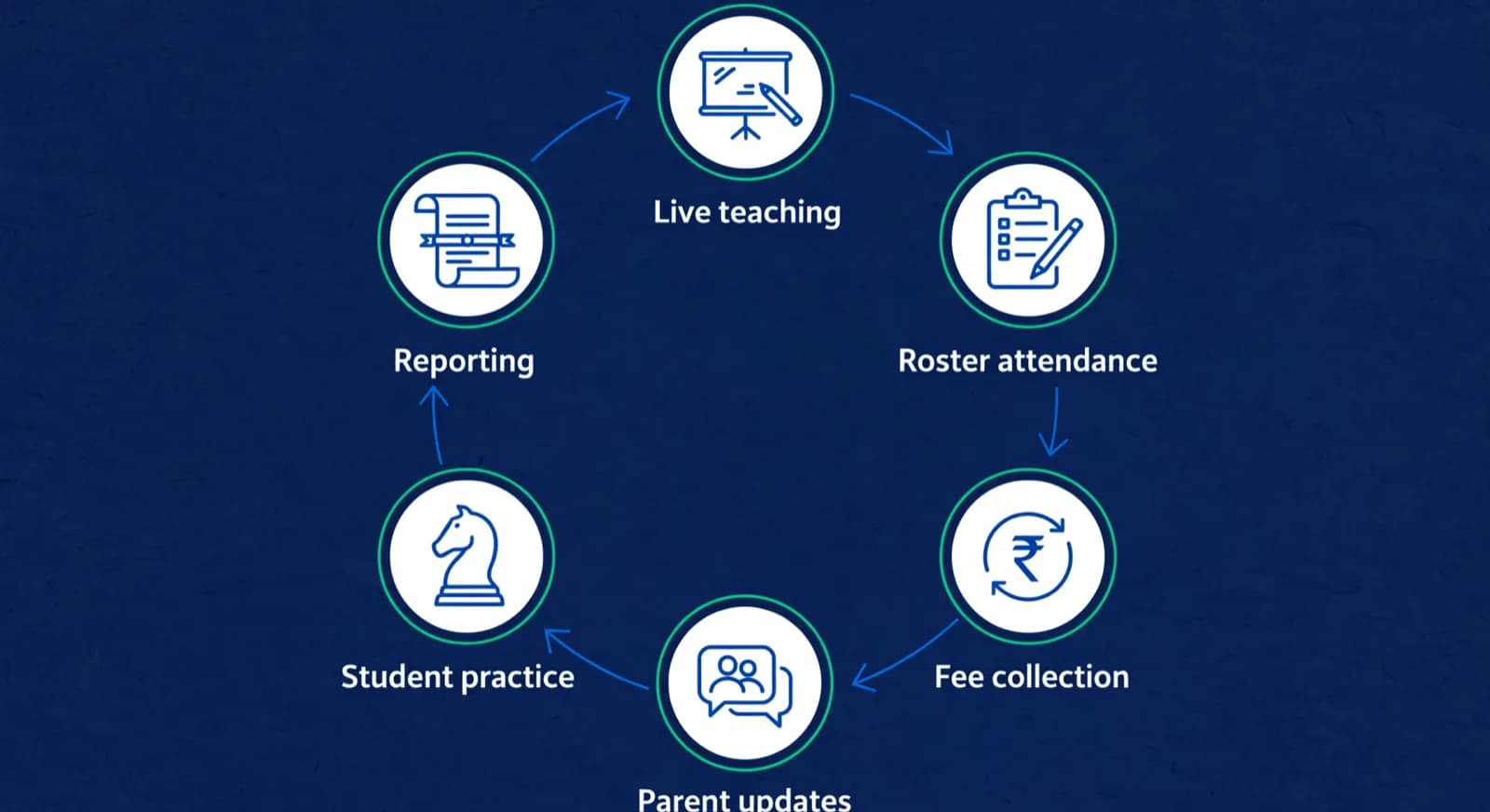
- Live teaching: the in-class experience, and for chess specifically whether there is a real interactive board, not just a video room.
- Roster and attendance: enrolling students, tracking who attended, and handling make-up classes without a spreadsheet.
- Fee collection: recurring monthly fees with as little chasing as possible, which in India means UPI AutoPay rather than monthly links.
- Parent communication: how updates reach parents, and whether they are automated or still typed by hand every time.
- Student practice: what students do between classes, and whether practice can be built from their own games and weaknesses.
- Reporting: progress reports parents actually read, that speak to chess improvement rather than just hours attended.
Notice that two of these six, live teaching with a real board and student practice from real games, are chess-specific. A general tutoring platform can do the other four for any subject, but a chess academy lives or dies on these two as well. This is exactly why the chess-specific versus general distinction matters when you look at any candidate: a tool can score full marks on admin and zero on the chess jobs, and a feature checklist will not show you that gap unless you are looking for it. If you are also weighing a general class management platform against a chess-specific one, our comparison of chess-native platforms against generic class management software goes deeper on exactly that split.
What should you test on a trial before deciding?
Test the six jobs above with your own data, not a vendor's demo roster. For ChessPlay or any academy software, that means running one real live class, enrolling a real student and marking attendance, setting up one recurring fee the way you actually collect, and generating one parent report. For CircleChess or any coaching provider, that means booking the demo class itself and judging the named coach's teaching style and the mentor follow-up directly, since the product you are buying is the coaching relationship, not a dashboard.
Where does ChessCore fit for an academy owner?
This section only matters if your job is the first one, equipping your own coaches to run an academy. In that case ChessCore, which we build, is in ChessPlay's category, not CircleChess's: it is academy management software, not a coaching course, so it should never be weighed against a Caissa School of Chess tuition fee as if they were the same product. If you are already on ChessPlay and want a like-for-like view, our ChessPlay.io alternative page sets out how the two compare for a switching owner; this section stays on the cost question an owner actually needs.
The cost comparison, within the academy-software job. ChessPlay publishes one flat fee of $99 USD a month, billed monthly, for unlimited students, coaches and branches [3], which is $1,188 USD a year at any roster size. ChessCore prices by flat capacity tier in USD, and the tier you need depends on both roster size and which features you require, because some features start on a paid tier. Core covers up to 100 students at $69 USD a month billed annually ($828 USD a year) or $89 USD billed monthly. UPI AutoPay and WhatsApp payment links start on the Grow tier, which covers up to 500 students at $109 USD a month billed annually ($1,308 USD a year) or $139 USD monthly. Automatic Lichess and Chess.com game sync starts on the Pro tier, up to 1,000 students at $149 USD a month billed annually ($1,788 USD a year) or $179 USD monthly. So an Indian academy that wants recurring UPI AutoPay collection is comparing ChessPlay's $99 flat against ChessCore Grow, not Core, whatever its roster size.
| What the owner needs | ChessPlay, per year | ChessCore tier required | ChessCore, per year (billed annually) |
|---|---|---|---|
| Up to 100 students, no gated features | $1,188 USD ($99 x 12) | Core | $828 USD |
| UPI AutoPay or WhatsApp payment links | $1,188 USD | Grow (feature starts here) | $1,308 USD |
| Automatic Lichess and Chess.com game sync | $1,188 USD | Pro (feature starts here) | $1,788 USD |
| 251 to 500 students | $1,188 USD | Grow (roster limit) | $1,308 USD |

October progress report · Lucas M.
1 of 14 drafts for Batch B2
Lucas attended 4 of 5 classes this period and played 18 rated games, moving from 1310 to 1342.
His endgame conversion improved clearly. Next month the focus is back-rank defense, based on the mistakes tagged in his last three games.
Highlighted numbers come from your attendance and rating records. The AI cannot change them.
Goes to the Müller family after approval
Read the table by feature, not just headcount. Up to 100 students with no gated feature, ChessCore Core at $828 USD a year undercuts ChessPlay's flat $1,188 USD. The moment you need UPI AutoPay, WhatsApp payment links or automatic game sync, the required ChessCore tier (Grow or Pro) costs more per year than ChessPlay's flat fee, because ChessPlay bundles everything into one price. Price is one line of the decision; run the same jobs on both before a yearly gap of a few hundred dollars decides your software. For a wider shortlist on the same operational criteria, see our roundup of the best chess academy management software.
Fees · October · all batches
136 of 148 paidCollected · this term
92%Lucas M. · October · $180
Card AutoPay · receipt sent to Müller family
Mia G. · October · $180
Payment link opened in WhatsApp
Batch B2 · 12 of 14 paid
No bank-transfer screenshots needed
AutoPay mandates · 41 active
Renew monthly without reminders
How do you turn this into one decision?
Choose the category that fits your purchase, then compare candidates within it. For academy software, rank live teaching, attendance, fees, parent communication, practice and reporting by the time your team spends on them. Ask each coach to identify a task they repeat each week and use those tasks in the trial. For coaching, compare the teacher's experience with students at your child's level, the lesson format and the practice support. A title can help you assess playing strength, but the demo should also show how the teacher explains a mistake and checks understanding.

| Decision step | What you do | Why it matters |
|---|---|---|
| Weight the jobs | Rank the six jobs by how much each hurts today | Stops a long feature list from outvoting your real pain |
| Score from evidence | Fill each tool's cells from its site, then the trial | Replaces borrowed summaries with current first-party facts |
| Price the whole stack | Add any tools a candidate makes you keep using | A cheap core plus three add-ons is not actually cheap |
| Decide and revisit | Pick the highest weighted total, recheck in a season | Your weak jobs change as the academy grows |
Budget for the whole arrangement before you sign up. For software, include any video, messaging or payment tools you would still need alongside the subscription, and model the cost at your projected roster size a year ahead. For coaching, request the total course fee, lesson count and payment schedule, then compare them with your family's budget and availability. Our academy break-even calculator can help an owner examine fee income and costs. For a wider software shortlist, our roundup of the best chess academy management software uses the same operational criteria across more tools.
Frequently asked questions
Which is better, ChessPlay or CircleChess?
ChessPlay fits an owner evaluating academy-management software; CircleChess fits a parent or player evaluating coaching. ChessPlay supplies class, attendance, fee and reporting tools, while CircleChess offers lessons through Caissa School of Chess. For software, test your own weekly tasks. For lessons, assess the coach, class level and practice plan in a demo. Choose based on the purchase you need rather than treating the two as interchangeable subscriptions.
What is ChessPlay?
ChessPlay is chess academy management software: coaches and academies run live classes, homework, tournaments, attendance tracking, and fee collection from one branded platform, with Lichess and Chess.com sync for student games. It publishes a flat price of $99 USD a month for unlimited students, coaches, and branches, and its homepage states it is used by more than 150 academies and over 500 coaches and families.
What is CircleChess?
CircleChess is a chess company that runs several separate products rather than one. Its about page lists Caissa School of Chess for live online coaching, the Caissa App for practice, a tournament manager called Chessmaster for organisers, and CircleChess Events, a tournament database it calls the largest in India. A parent buying lessons uses Caissa School of Chess; an organiser running a tournament uses Chessmaster. The products it lists are for learners and organisers, not for administering your own academy.
How is ChessCore different from a general academy tool, and where does it fit next to ChessPlay?
ChessCore sits in the same category as ChessPlay, chess-specific academy management software, not in CircleChess's coaching category. It offers an interactive board for live teaching and review, built-in attendance and make-up scheduling, recurring Indian fee collection, and AI-written report text that waits for a coach to approve it. It is a single product, not a multi-subject institute LMS, so a centre teaching several subjects may prefer a horizontal tool like Classplus or Teachmint instead.
What should I test during a free trial or demo class?
For academy software, run a class, enrol a student, correct an attendance mark, set up a fee and produce a parent report. We suggest a trial long enough to include your normal weekly routine and a coach handover. For coaching, use the demo to assess the teacher's explanations, pacing and response to your child's mistakes. Ask who handles practice questions afterwards and whether the same coach will teach the paid course.
Sources
- [1]Chess Academy Software to Teach Chess Online | ChessPlay.io · accessed 2026-10-16
- [2]About CircleChess · accessed 2026-10-16
- [3]Pricing | ChessPlay.io · accessed 2026-10-16
- [4]Caissa School of Chess, CircleChess · accessed 2026-10-16
Written by Abhishek Tiwari
ChessCore
Drafted with AI, fact-checked and approved by a human before publishing, the same guardrail our product applies to every report it sends. Read our editorial standards.
Score ChessCore on your own six jobs
Book a walkthrough and run one real class, one real fee, and one real parent report, then compare it against your ChessPlay and CircleChess findings.
- Roster import from the spreadsheets you already keep
- Lichess and Chess.com connections, batches, and fee plans
- First reports in week one, after your approval
- Free plan, no credit card required