
On this page8 sections, 18 min read
- What does running a chess academy actually involve?
- What should happen when a term closes?
- How should you structure batches and the weekly schedule?
- How do academies structure and collect fees?
- How do you track attendance without losing trust?
- How do you keep parents informed without drowning in chats?
- How do you keep students from quitting?
- When do spreadsheets stop being enough?
- Frequently asked questions
Bottom line
Running a chess academy means executing the same weekly loop well: intake and trial placements, level-based batches, classes that produce homework, synced games and review, structured parent updates, a fixed fee cycle, and a monthly retention review. Give each loop a day, an owner, a record it produces and a response when it is missed, and the academy runs on routine instead of memory.
TL;DR
- A well-run chess academy is a weekly operating calendar: every recurring job has one slot, one owner, a record it produces and a response when it is missed.
- Batches are grouped by playing strength rather than age, sized so the coach can still review individual games, and kept stable for a full term unless a student is clearly in the wrong group.
- Fees run on a fixed invoice date with a reminder ladder; payment links or UPI AutoPay mandates reduce the chasing, and a person makes the personal call.
- Attendance, make-up credits, and parent updates are one connected system: parents trust numbers they can see reflected every week.
- A monthly retention review that flags slipping attendance, flat ratings, and missing homework catches quitters a term before they quit.
Key facts
- UPI AutoPay lets a parent approve a recurring payment mandate once, after which the fee debits automatically every cycle.[4]
- Lichess studies are free shared analysis boards, which makes structured homework between classes possible at zero cost.[1]
- Stockfish is a free and open-source chess engine, so weekly game review for every batch costs an academy nothing in software.[2]
- WhatsApp Business provides labels, quick replies, and away messages designed for small businesses managing customer conversations.[3]
- Most online platforms rate players with Elo-derived systems, so even a brand-new student acquires a usable strength number within a few dozen games.[5]
What does running a chess academy actually involve?
To run a chess academy, give every recurring job a fixed day and a named owner: intake on one day, classes on two, game review and homework on a third, one structured parent update a week, a fixed invoice date with a reminder ladder, and a monthly retention review. The operating calendar below shows that week, and the sections after it expand each loop with the thresholds and timings that keep it from slipping.
This guide is about operating, not founding. If you are still choosing a venue, registering the business, or filling your first batch, start with our guide to starting a chess academy and come back here once classes are running. A school chess club can begin with a room, a weekly slot and sets, as Chess House's guide explains [7], and a school-club organizer who only needs a weekly hour should not copy the fee cycle or the seven commercial loops. Operating a paid academy is a different discipline: the founding decisions are made once, but the loops below repeat every week for as long as the academy exists. The quality of an academy is the quality of its most neglected loop. A brilliant coach with chaotic fee collection bleeds families just as surely as a tidy administrator who never reviews student games.
The most useful way to see the whole job is a week in the life of a well-run academy. The table below is the operating calendar this entire guide expands on. Days are illustrative: shift them to match your class days, but keep the principle that each loop happens at the same time every week, owned by a named person. A two-coach, three-batch academy can run exactly this shape without changing a single row.
| Day | Operating loop | What the operator does | Owner (role) | Record produced | If the job is missed |
|---|---|---|---|---|---|
| Monday | Intake | Return trial enquiries, run a short assessment game, place new students into a batch by strength | Admin or head coach | Enquiry list entry with trial date and placement | An enquiry older than 48 hours gets a call from the owner the next day |
| Tuesday | Classes | Teach, mark attendance during the warm-up puzzles, log absences so any credit follows the make-up policy | Class coach | Attendance register for the session | Fill the register from the coach's notes before the next class, never from memory at month end |
| Wednesday | Game review and homework | Pull the week's online games, review one game per student, set homework positions | Class coach | Homework set per student, with a link | Carry unreviewed students to Thursday's list and never skip the same student twice |
| Thursday | Classes | Second batch session, collect and discuss homework, mark attendance exactly as on Tuesday | Class coach | Attendance register; homework returned or not | Same as Tuesday |
| Friday | Parent updates | Send one structured update per family, then answer questions inside a fixed office-hour window | Head coach or admin | One update per family in the message history | Send on Saturday morning and note the slip; if it slides twice, change the owner or the slot |
| Saturday | Practice and make-ups | Rapid ladder or tournament prep, plus the buffer slot where make-up credits are used | Coach on duty | Attendance marks for the make-up class | Offer the next make-up slot inside the credit window |
| Month end | Fees and retention | Issue invoices on the fixed date, follow up unpaid ones, review attendance and rating trends for at-risk students | Owner and admin | Invoice list showing paid, part-paid and unpaid; flagged-student list | Personal call within the week for unpaid invoices; call flagged families before they call you |
Put recurring jobs on the calendar so coaches and families know what to expect. The days and durations here are planning choices, not universal requirements: move them to match your class days, and keep the principle that each loop has a slot, a named owner, a record and a response to a miss. A fixed homework day gives students a deadline; a fixed parent-update day tells families when they will hear about progress; a fixed invoice day keeps the payment record in one place. Use a timetable that records attendance so the class loops and the register stay together, and draft the week on paper first with the free chess class schedule maker. If a job slips twice, change the workload or assign another person rather than leaving the date on paper while the task goes undone.
Put rough hours on the calendar before you trust it. The figures below are illustrative arithmetic for a 60-student academy, not measurements, but they show where the week goes: teaching is about two thirds of the load, and the admin loops together cost around seven to eight hours a week (2 + 3 + 2 hours, plus the monthly fee and retention work), which is a part-time job in its own right. The right-hand column is the early warning for each loop. When one of those signs shows two weeks running, give the loop a new owner or a new slot before it fails silently.
| Loop | Illustrative weekly load at 60 students, 6 batches | Threshold that says the loop is slipping |
|---|---|---|
| Teaching | 6 batches x 2 sessions x 75 minutes = 15 coach hours (before preparation and review) | Coaches are skipping game review or notes; the hiring guide shows how to assess load and when to hire your next coach |
| Intake | 4 enquiries x 30 minutes (call plus assessment game) = 2 hours | An enquiry unanswered for more than 48 hours |
| Game review and homework | 60 students x 3 minutes on one game = 3 hours | Fewer than half the students get a reviewed game in a fortnight |
| Parent updates | 60 families x 2 minutes on a structured template = 2 hours | The Friday update slides to Saturday twice in a month |
| Fees | Invoice day 1, reminder day 4, personal call day 8: about 1 hour a month at 90% on time | More than 6 families still unpaid on day 8 |
| Retention review | 30 minutes a month, plus one call per flagged name | More than 5 names flagged in one month |
What should happen when a term closes?
Close each term with a handover that gives every item an owner: the final classes, unpaid fees, make-up credits, reports and next-term placement. This is the moment the weekly loops meet, and a term that simply runs into the next one carries unpaid balances, expiring credits and wrong placements into a new timetable. Equipment, rooms and the first-class layout belong to launch, so they live in our guide to starting a chess academy; a school club that only needs a room, a weekly hour and one set for every two children can start from Chess House's club kit [7].
| Handover item | Owner | Done when |
|---|---|---|
| Final classes | Class coach | Every session of the term has attendance marks or a note explaining the gap |
| Unpaid fees | Admin | Every family is marked paid, part-paid or unpaid, and each unpaid family has had a personal contact |
| Make-up credits | Admin and coach | Outstanding credits are listed with their expiry dates, reminders are sent and lapses are logged under the make-up policy |
| Reports | Head coach | Each family has this term's progress report, and any AI-drafted wording has been edited by a coach |
| Next-term placement | Head coach | Placement uses rating trend and attendance, and families hear about a move before the new timetable is published |
| Re-enrolment | Admin | Every student is marked continuing, paused or leaving, with a reason where the family gave one |
How should you structure batches and the weekly schedule?
Group students into batches by playing strength, not age, size each batch so the coach can still review individual games, and keep the timetable stable for a term. A nine-year-old at 1200 and a fourteen-year-old at 600 need different lessons, and mixing them serves neither.

Strength banding is practical because ratings are cheap to obtain. Online platforms rate players with Elo-derived systems [5], so even a complete beginner has a usable number within a few dozen games, and your Monday assessment game fills the gap before that. Bands, rating cut points and batch sizes are the subject of our batch scheduling guide; at the operating level you only need three decisions written down.

Week of 12 October · all batches
0 conflictsMake-up credit · Mia G. · Sat 4:30 PM
Absent Thursday with notice · booked by Noor
Class reminders sent to 148 families
Timing changes update everyone at once
| Operating decision | Rule to write down | Owner |
|---|---|---|
| Placement | One named rating pool plus a placement game, reviewed after a few sessions | Head coach |
| Size ceiling | The number of students whose game review still fits inside the lesson, lower as the level rises | Head coach |
| Moves between batches | At term close unless a student is clearly in the wrong group; the family hears first | Head coach, with admin updating the timetable |
Leave a buffer slot with no regular batch, perhaps on Saturday, for make-ups, assessment games and occasional rescheduling. Families organise school pickups, other tuition and sport around your timetable, so give them notice before a move. Our batch scheduling guide covers coach loading and timetable design; the make-up class guide covers the credit arrangements when a student misses a session.
How do academies structure and collect fees?
Bill each batch level a flat monthly or quarterly fee in advance, on a fixed date, and give one person responsibility for pending payments. Put invoice day, reminder day and follow-up day on the calendar alongside classes. What to charge is its own decision, shaped by your city, your coach costs and what the local market bears; our fee structure guide compares the fee models and works through the pricing question.
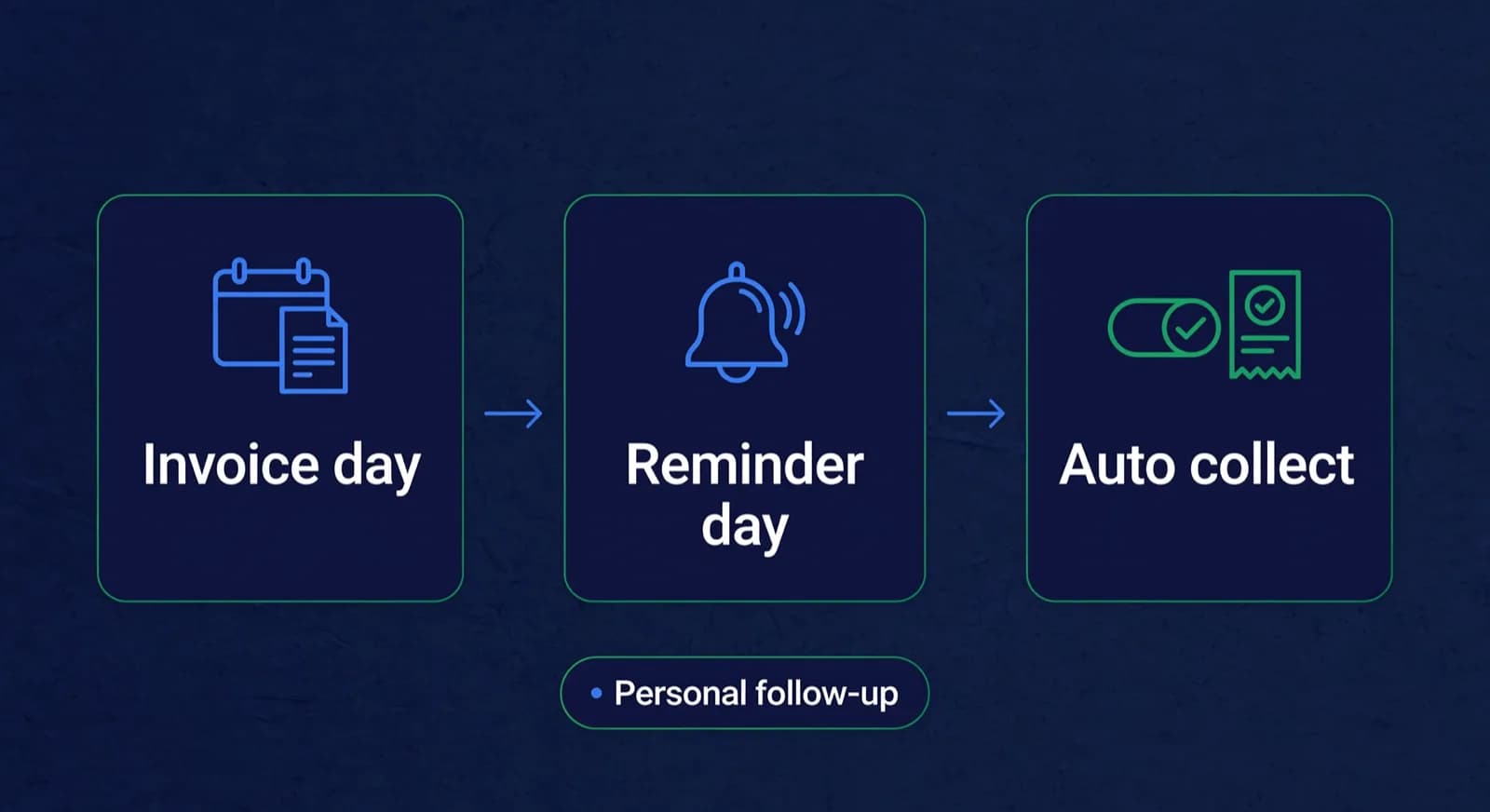

Collection is where discipline pays most visibly. Pick one invoice date, send every invoice that day, send one polite reminder three days later, and have a named person make the personal call on day seven. These intervals are illustrative; what matters is that they are fixed and applied to every family. For Indian academies, UPI AutoPay removes most of the chasing: the parent approves a recurring mandate once and the bank debits the fee each cycle [4]. Fee reminders themselves can go out on a schedule the academy switches on, while a personal call stays with a person. A dated receipt for every payment matters as much as the debit: a parent who has a receipt for March never has a dispute about March.
Fees · October · all batches
136 of 148 paidCollected · this term
92%Lucas M. · October · $180
Card AutoPay · receipt sent to Müller family
Mia G. · October · $180
Payment link opened in WhatsApp
Batch B2 · 12 of 14 paid
No bank-transfer screenshots needed
AutoPay mandates · 41 active
Renew monthly without reminders
For operations, the only rule that matters is consistency: one price list, one invoice date, one escalation path, applied identically to every family, including the ones you know socially. Exceptions made quietly for one parent become entitlements for all of them within a term.
How do you track attendance without losing trust?
Mark attendance in the first five minutes of every class, in front of the students, against a roster whose numbers parents see reflected in their weekly update. Attendance destroys trust only when it lives in a private notebook and surfaces for the first time during a fee dispute.
The mechanics are simple and the discipline is everything. The coach marks the register while students solve the warm-up puzzles, so it costs no teaching time. An absence is logged the same day, not reconstructed at month end from memory, because reconstructed attendance is exactly the kind of number a parent will dispute. And every absence triggers a consequence the family already knows from the written policy: either it lapses, or it becomes a make-up credit with an expiry date. Our attendance tracking guide covers register design and edge cases, and the make-up class guide covers the credit ledger in detail.
Use attendance as a prompt to check in when a student misses classes. An absence may reflect a timetable problem, illness or fading interest; the register alone cannot tell you which. Keep it current so the retention review later in this guide starts with a specific question for the family, rather than a guess based on a month-old notebook.
How do you keep parents informed without drowning in chats?
Send one structured update per family on a fixed day each week, and confine ad hoc conversation to a published office-hour window. Parents do not need more messages from a chess academy; they need predictable ones that always contain the same things: attendance, homework, and progress.
In practice this conversation happens on WhatsApp, because that is where the parents already are. WhatsApp Business adds labels, quick replies, and away messages built for exactly this kind of small-business communication [3], which is enough structure to run the Friday update loop without the chat swallowing your evenings. The discipline that makes it sustainable is the template: every update, every week, in the same order, so a parent can read it in thirty seconds and a coach can write it in two minutes.
- What the batch worked on this week, in one sentence a non-player can understand.
- Attendance: sessions attended out of sessions held, plus any make-up credit issued or redeemed.
- Homework: what was set, and whether last week's came back.
- One concrete moment from the student's own games, good or instructive.
- What happens next: the following week's topic, or an upcoming event.
The weekly update is the heartbeat; the monthly progress report is the deeper document, with rating trend and the coach's actual assessment, and our progress reports guide covers how to write one that parents keep. The trap to avoid is the unstructured group chat as the academy's only channel: group chats are fine for logistics broadcasts, but individual progress belongs in an individual thread, where the message history doubles as the academy's record of what each family was told and when.
How do you keep students from quitting?
Run a monthly retention review: list students whose attendance has slipped, whose rating is flat without recent feedback or whose homework has stopped coming back. Choose one follow-up for each name that week. Ask what changed before deciding whether the answer is a review session, a timetable adjustment or a pause in classes.
The review works because the warning signs are already in records you keep for other reasons. Attendance comes from the register. Homework completion comes from the Wednesday game-syncing loop: shared Lichess studies make structured between-class material free to set [1], so a student who stops opening them is telling you something. Rating trend comes from synced online games, and a plateau deserves a response rather than silence: a fifteen-minute engine review of one recent loss, with Stockfish doing the evaluation [2], gives the student visible evidence of what to fix while the rating refuses to move. For stronger juniors, a concrete goal does the same job; working toward a first FIDE-rated event [6] reframes a flat online rating as preparation rather than stagnation.
Each flagged name gets one of three actions: a conversation with the student, a call to the parent before they call you, or a batch change at the next term boundary. The pre-emptive parent call is the highest-value habit in this entire guide. Calling to say you noticed their child missed two sessions and here is the plan converts a quiet exit into a renewed commitment more often than any discount will. The full pattern of why families leave, and the scripts for those calls, is in our guide to why students quit chess academies; the operating takeaway here is simply that retention is a scheduled loop, not a reaction.
When do spreadsheets stop being enough?
Spreadsheets stop being enough when the loops start referencing each other faster than one person can copy between tabs: in practice, at the first of 30 students, a second coach, or a third batch, the same rule our guide on moving off spreadsheets uses. Below that line, a disciplined sheet runs chess academy operations perfectly well, and you should not pay for software out of aspiration.
The breaking point is not volume, it is joins. An absence on Tuesday should be recorded once and then drive the make-up credit and Friday's parent update; a payment should generate a receipt and close a reminder. Each of those is one manual copy in a spreadsheet, performed by a tired human at 9pm, and every miss lands in front of a parent. When you notice the same fact being typed into a third place, or a second coach asking which tab is current, the calendar has outgrown the tool. The honest comparison of costs and switching effort is in our spreadsheets versus academy software guide, and our list of questions to ask before buying academy software keeps any vendor conversation grounded.
Whatever tooling you choose, the operating calendar from the first section is the real system. Software can hold the register, run the fee cycle, and draft the Friday updates, but it cannot decide that intake happens on Monday and retention review happens at month end. Set the calendar first, run it manually until it hurts, and then let tools take over the loops you already understand.
Frequently asked questions
How do I get the first students if I am still launching?
Offer a free or low-cost trial class, tell nearby schools and parent WhatsApp groups about it, and follow up every trial family within 48 hours with a short note on what the child did well and which batch fits. Run trials on one fixed weekday so enquiries always have a next date to book. Keep a simple enquiry list (child, parent phone, trial date, follow-up sent) so no family is forgotten. For venue and registration steps, use our guide to starting a chess academy. A school-club launcher can also use Chess House's club-meeting kit (room, weekly hour, one set per two children) [7]. Do not copy the fee cycle here until you actually have a paid roster.
How do you manage a chess academy day to day?
Put every recurring task on a fixed weekly calendar with a named owner: intake calls on Monday, attendance marked in the first five minutes of each class, game syncing and homework midweek, one structured parent update per family on Friday, and fees plus a retention review at month end. Day-to-day management then becomes executing the same slots every week rather than reacting to whatever feels urgent.
How many students should one coach handle in a batch?
Cap a batch where the coach can still review individual games: roughly 8 to 10 students for beginner groups, 6 to 8 for intermediate, and 4 to 6 for advanced tournament players. The constraint is not crowd control but feedback quality. If the coach cannot look at one game per student per week and set personal homework from it, the batch is too large for the level.
How much time does running a chess academy take each week?
Beyond teaching hours, expect the operating loops themselves to take a few focused hours per week when they are scheduled: intake and placement on one morning, game review and homework setting midweek, parent updates in one Friday sitting, and a monthly half-day for fees and the retention review. The illustrative 60-student example above comes to about seven to eight hours. The time balloons only when loops are unscheduled, because every task then arrives as an interruption with a parent waiting on the other end.
What records do chess academy operations require?
Six records cover it: a roster with each student's batch and rating, an attendance register marked live in class, a make-up credit ledger with expiry dates, a fee record of invoices, payments, and receipts, links to each student's online games for review, and a log of what was sent to each parent and when. If each fact lives in exactly one place and the others reference it, disputes about attendance, money, or communication mostly disappear.
Do coaches need background checks to work with children?
Ask the host school, parks department or your own counsel which screening checks they require for adults working with children, and confirm the arrangements for substitute coaches too. Record the answer before the first class, name the person responsible for checking it and keep a record of completed checks. As an academy policy, do not assign a coach to supervise a batch alone until that person has completed the checks your school or adviser requires.
Sources
- [1]Lichess Study: shared analysis boards · accessed 2026-06-10
- [2]Stockfish: strong open-source chess engine · accessed 2026-06-10
- [3]WhatsApp Business · accessed 2026-06-10
- [4]UPI Autopay for Recurring Payments | NPCI · accessed 2026-10-16
- [5]Elo rating system · accessed 2026-06-10
- [6]FIDE: International Chess Federation · accessed 2026-06-10
- [7]Start a Chess Club at Your School, Chess House · accessed 2026-10-02
Written by Abhishek Tiwari
ChessCore
Drafted with AI, fact-checked and approved by a human before publishing, the same guardrail our product applies to every report it sends. Read our editorial standards.
Put your academy's week on one calendar
ChessCore keeps batches, attendance, make-up credits, the fee cycle and parent updates in one place. AI-drafted updates wait for a coach to approve them. Import your roster to see your week.
- Roster import from the spreadsheets you already keep
- Lichess and Chess.com connections, batches, and fee plans
- First reports in week one, after your approval
- Free plan, no credit card required